Select Inspection Form
Choose from library or create custom checklists
Streamline inspections with digital checklists, track corrective actions, and maintain complete inspection records. Ensure 100% DOT compliance with automated inspection workflows.
No credit card required
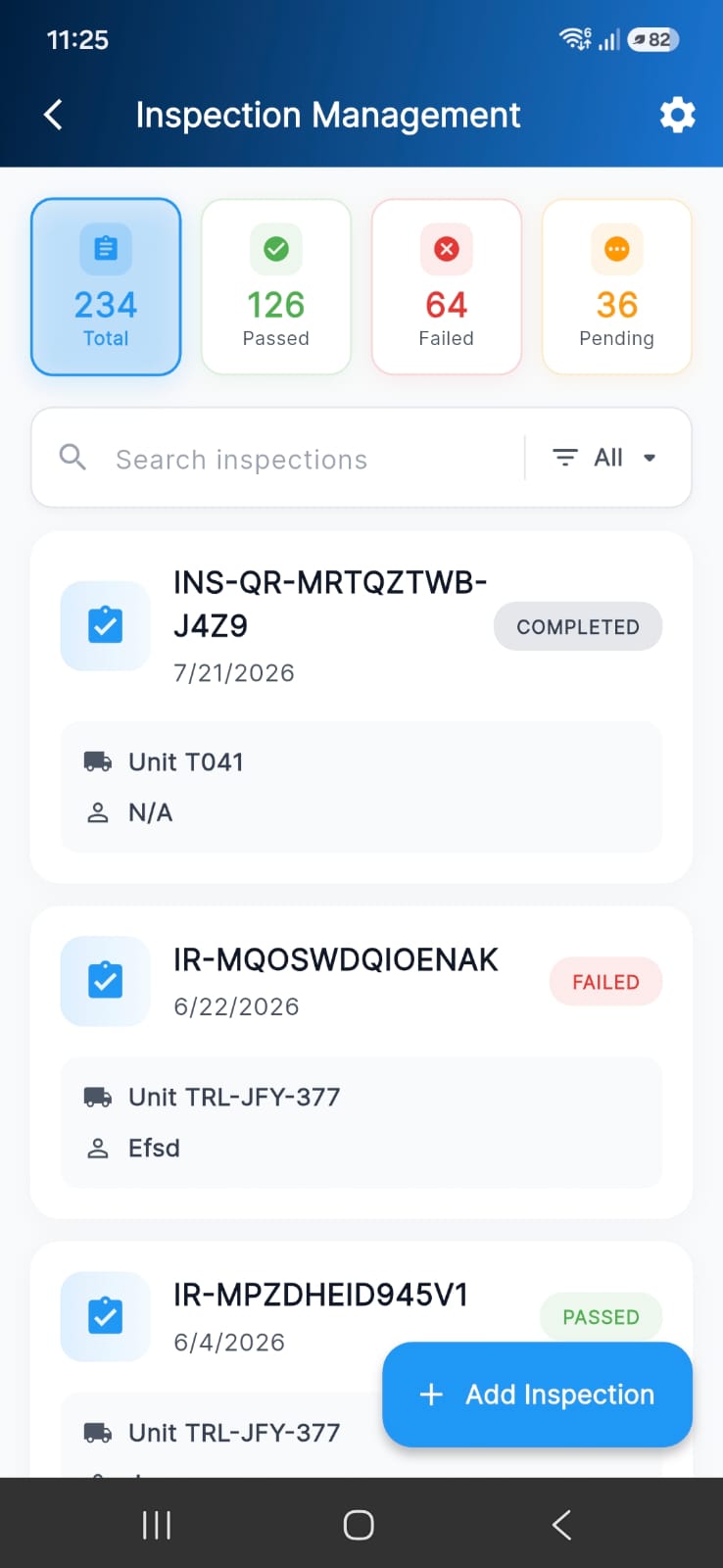
Choose from library or create custom checklists
Complete checklist and document faults with photos
Monitor corrective actions until completion
Inspection History
Track all inspections with complete details including report numbers, dates, fleets, locations, inspectors, faults, corrective actions, and linked work orders.
Inspection Forms
Access a comprehensive library of pre-built inspection forms or create custom checklists tailored to your fleet's specific requirements.
Fault Management
Document inspection faults with detailed descriptions and photos. Track corrective action status and link directly to work orders for repairs.
Winter Checklist for Trucks
Pre-Trip Inspection Checklist
Pre-Trip Inspection Checklist
Incident Reports
Document accidents, damage, and safety incidents with comprehensive forms including photos, detailed descriptions, severity ratings, and weather conditions.
2001 MACK CHE13 TRI-AXLE TRUCK TRACTOR
VOLVO Loader Truck Tractor
Document accidents and safety incidents with photos & severity ratings
Mobile Inspection
Conduct inspections anywhere with mobile-optimized forms. Capture photos, document findings, and submit inspections in real-time from smartphones or tablets.
Digital Inspection Tools
Everything you need to conduct, track, and manage fleet inspections for complete DOT compliance
Pre-built and custom inspection forms for all equipment types.
Capture and attach photos directly from mobile devices.
Document defects with detailed descriptions and corrective actions.
Create work orders directly from inspection faults for repairs.
Assign inspections to specific inspectors with accountability tracking.
Record inspection location for multi-site fleet management.
Create detailed incident reports with photos and severity ratings.
Complete audit trail of all inspections with search and filter.
Generate DOT compliance reports for audits and inspections.
Notifications for overdue inspections and pending corrective actions.
Build equipment-specific inspection forms with custom fields.
Conduct inspections from smartphones and tablets with offline mode.
Proven Results
Transportation Company Reaches 100% DOT Compliance
Zero violations in 18 months
Inspection time reduced
Early issue identification
“FleetRabbit AI's digital inspection system transformed our compliance program. We went from constant DOT violations and failed audits to 100% compliance. The mobile app made inspections faster and more thorough, catching issues before they became roadside failures.”
33% Improvement
73% Faster
“Digital inspections with photo documentation saved us during a DOT audit. We had complete records for every vehicle going back years. The auditor was impressed.”
“Our drivers love the mobile app. Pre-trip inspections are faster and more consistent. The fault tracking ensures nothing gets missed and repairs are completed promptly.”
“Managing 42 custom inspection forms across different equipment types was impossible with paper. FleetRabbit AI's form library and custom builder solved everything.”
Starting an inspection takes just a few taps. Select an inspection form from the built-in library or choose one of your custom checklists, pick the fleet unit being inspected, and assign an inspector. Complete the checklist item by item, document any faults with photos and descriptions, and submit. The inspection is instantly saved to the vehicle's history with a report number, date, location, and inspector details.
FleetRabbit AI includes a comprehensive library of pre-built forms covering pre-trip and post-trip checklists, DOT/DVIR inspections, equipment-specific forms, and seasonal checklists like winter inspections for trucks. You can copy any form from the library and adapt it, or use the custom form builder to create equipment-specific checklists with your own items and fields — many fleets manage 40+ active forms across different equipment types.
When an inspection uncovers a defect, document it with a detailed description and photo evidence. Each fault carries a corrective action status — Not Taken, Pending, or Taken — so nothing slips through. Faults can be linked directly to work orders for repairs, and you can monitor every corrective action until completion from the fault management dashboard. Automated alerts notify you of pending corrective actions.
Yes, FleetRabbit AI includes a comprehensive incident reporting system. Create incident reports with incident number, date, time, location, incident type, severity rating, fleet information, operator details, weather conditions, and fleet activity at time of incident. Upload up to 6 photos documenting the incident. Include detailed descriptions of how the incident occurred, what broke or was damaged, and additional comments. All reports are searchable, downloadable, and linked to specific fleet units.
Every completed inspection is stored in a permanent, searchable audit trail with complete details — report number, date, fleet unit, location, inspector, faults found, corrective actions, and any linked work orders. Search and filter by vehicle, date range, inspector, or status to find any record in seconds. This complete history is exactly what DOT auditors want to see, and reports can be generated for audits at any time.
Absolutely. The custom form builder lets you create inspection checklists tailored to your fleet's specific requirements — add your own checklist items, custom fields, and equipment-specific sections. You can also copy an existing form from the library and modify it, which is the fastest way to build seasonal or equipment-specific variants. Each form tracks its own usage so you can see which checklists your team relies on most.
Yes — inspections work on Android, iOS, and desktop. The mobile-optimized forms support one-tap photo capture from the device camera, GPS location tagging, digital signature capture, voice-to-text notes, and barcode/QR code scanning. Offline mode lets drivers complete inspections anywhere with no signal; everything syncs automatically when connectivity returns.
Implementation is immediate. Select inspection forms from the built-in library or create custom forms for your fleet. Add vehicles to your inventory, assign inspectors, and start conducting digital inspections right away. The system requires no special hardware — just use smartphones or tablets with cameras. Training takes minutes as the interface is intuitive and designed for field use. Historical paper inspection records can be retained as reference while you transition to digital.
 FleetRabbit AI
We’ll show you how FleetRabbit AI fulfills
your fleet’s goals.