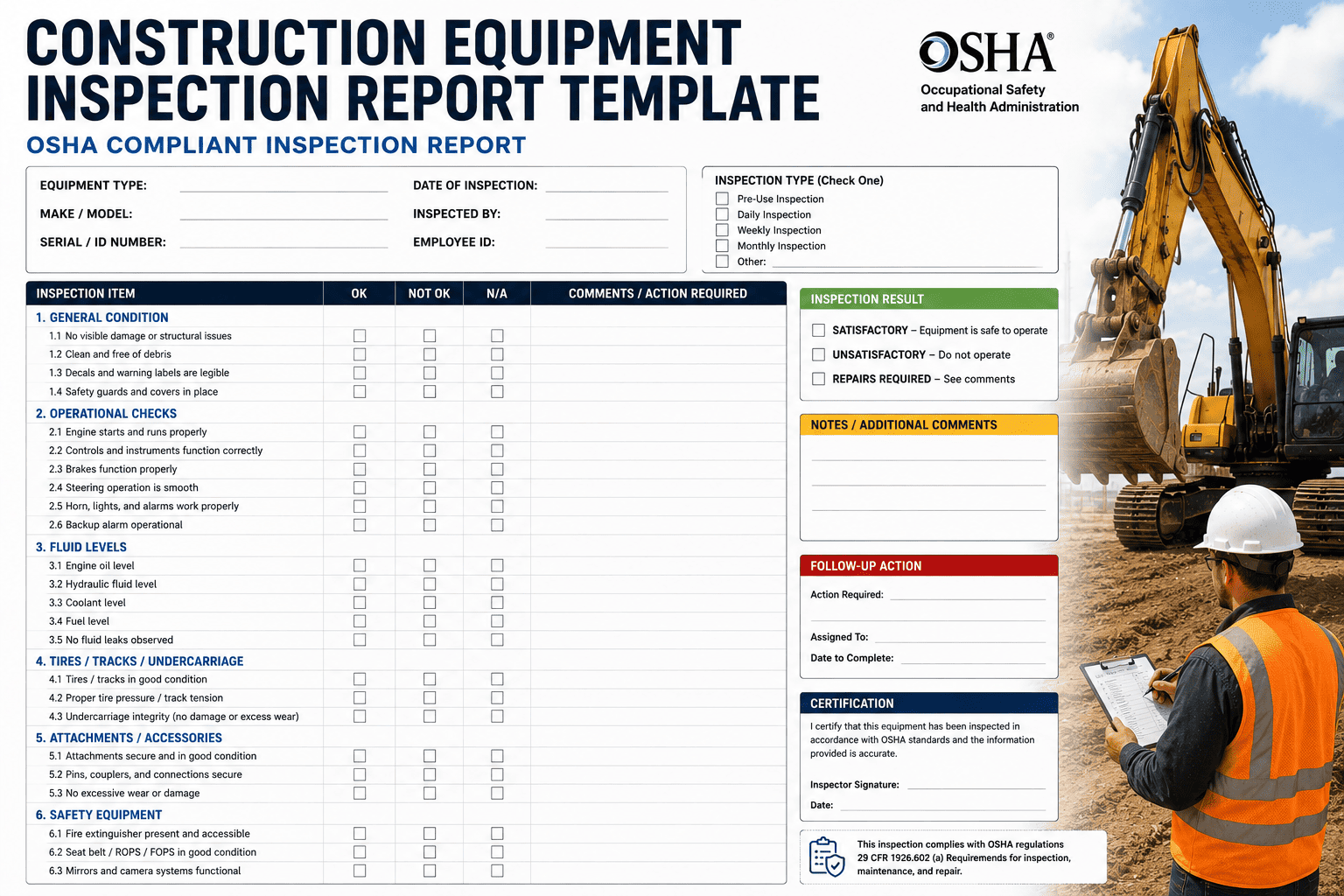
An OSHA inspector does not ask whether your crew inspects equipment before every shift. They ask you to prove it, on the spot, with a record that shows who inspected what, when, and what happened to any defect that was found. Most construction companies do not fail audits because they skipped inspections. They fail because the inspection happened, got scribbled on a paper form, and then disappeared into a truck cab or a supervisor's desk drawer where nobody could produce it fast enough. The report format is not paperwork for its own sake. It is the only thing standing between a routine walkaround and a citation that can run into six figures.
An OSHA-compliant equipment inspection report needs six core elements: equipment identification, inspector name and signature, date and time, the specific items inspected, findings for each item, and documented corrective action for any defect. Photo evidence strengthens every entry. Paper-based inspection records pass audits roughly 73 percent of the time, while digital records with timestamps, GPS location, and photo proof pass around 96 percent of the time. FleetRabbit captures every field automatically and stores completed reports in a searchable, audit-ready archive.
The Six Fields Every OSHA Inspection Report Needs
OSHA 29 CFR 1926.20(b) does not hand you a fill-in-the-blank form, but decades of citations have made the required elements clear. Miss any one of these six fields and the report will not hold up when an inspector asks to see it.
Equipment Identification
Asset ID, make, model, and serial or barcode number, so the report ties to one specific machine, not a general category of equipment.
Inspector Name and Signature
The name of the competent person performing the inspection, with a signature confirming they actually completed it, not a supervisor signing off after the fact.
Date and Time
A timestamp proving the inspection happened before the equipment was placed into service for that specific shift, not sometime earlier in the week.
Items Inspected
Every checklist point covered, from fluid levels and hydraulic hoses to structural components and safety devices, specific to that equipment type.
Findings and Defects
A clear pass or fail result for each item, with defects described in enough detail that a technician knows exactly what needs attention.
Corrective Action Taken
Proof that a defect was fixed and verified before the equipment returned to service, closing the loop instead of leaving the finding open.
Why Paper Reports Keep Failing Audits
The gap between paper and digital inspection records is not a small margin. Paper forms achieve roughly 73 percent audit pass rates, while digital systems with timestamped entries and photo evidence reach around 96 percent. The reason is simple: paper forms get lost, arrive with missing fields, cannot prove exactly when they were completed, and fail the "readily accessible" standard the moment an inspector shows up unannounced and asks for records on the spot.
The Real Cost of a Missing Record
A serious OSHA violation can run up to roughly 16,550 dollars per instance, and a willful or repeated violation can climb past 165,000 dollars. Beyond the citation itself, equipment failures tied to poor documentation can trigger work stoppages costing tens of thousands of dollars per day and insurance premium increases in the range of 30 to 50 percent. A missing signature or an illegible entry is rarely the actual safety failure. It is the paperwork gap that turns a routine inspection into a compounded violation.
What auditors actually look for
Inspectors are checking for proof that inspections occurred, that a qualified person performed them, that any defect was documented, and that corrective action happened before the equipment went back to work. Records that cannot be produced within minutes are treated the same as records that never existed.
FleetRabbit pushes the correct inspection checklist to every operator's phone before each shift, captures photo evidence of any defect, and stores the completed report in a searchable, audit-ready archive. Sign up free to digitize your inspections today, or book a demo to see an audit pull happen in under three minutes.
Categorizing Defects by Severity
Not every defect found during an inspection means the same thing, and a report that treats a hairline paint crack the same as a hydraulic hose about to burst is a report that will eventually miss something serious. Build severity into the report format itself.
| Severity Level | What It Means | Required Action | Example |
|---|---|---|---|
| Critical | Immediate risk to safe operation | Tag out and remove from service immediately | Hydraulic hose bulging or leaking under pressure |
| Restricted | Non-critical but needs a fix window | Controlled use with a named repair owner and deadline | Worn backup alarm still functional but degraded |
| Monitor | Early wear, not yet a safety issue | Log and re-check at the next inspection cycle | Minor surface rust on a non-structural bracket |
Retention Requirements by Equipment Type
Documentation requirements are not identical across every machine. Cranes carry the most detailed rules, while general earthmoving equipment has more flexibility in format but still requires a documented record every shift.
| Equipment Type | Inspection Frequency | Retention Period | Governing Standard |
|---|---|---|---|
| Cranes | Shift, monthly, annual | 12+ months, life of equipment for modifications | 29 CFR 1926.1412 |
| Excavators, Loaders, Dozers | Frequent and regular, pre-shift | Varies by jurisdiction, 3-5 years recommended | 29 CFR 1926.600, 1926.20 |
| Powered Industrial Trucks | Daily, before service | Recommended minimum 2 years | 29 CFR 1910.178(q) |
| Aerial Lifts | Pre-shift, per manufacturer | Recommended minimum 3 years | 29 CFR 1926.453 |
Building a Report Format That Survives an Audit
Start with a template that locks in the six required fields so no operator can submit an incomplete report. Add severity tagging so defects get routed by urgency instead of sitting in a general notes field. Require a photo whenever a defect is logged, since a photo turns a written claim into evidence an inspector cannot dispute. Finally, make sure every completed report lands in one searchable system rather than scattered across individual supervisors' phones and paper binders.
The follow-through step most templates skip
A report that logs a defect but never shows it was fixed is arguably worse than no report at all, because it proves the company knew about an unsafe condition and kept operating anyway. Every report format needs a closed-loop field showing the repair was completed and verified before the machine went back to work.
FleetRabbit automatically routes flagged defects into a work order, tracks repair sign-off, and keeps the full chain of evidence attached to the original inspection. Sign up free to launch your first digital inspection template, or book a demo to see the full defect-to-repair workflow.
Frequently Asked Questions
A checklist only protects your company if the record survives to prove it happened. FleetRabbit captures every required field, routes defects to repair, and keeps your full inspection history one search away from any OSHA request.







