Buying construction fleet software is the easy decision. Getting your mechanics, operators, and project managers to actually use it every single day is where most rollouts quietly fall apart. Industry data puts it plainly: 67 percent of fleet software deployments in construction take longer than planned, 40 percent never reach full user adoption, and the average company burns 15,000 to 40,000 dollars on a failed first attempt before finding a platform that actually fits how field teams work.
None of that is a software problem. It's a rollout problem. The construction fleets that go from signed contract to measurable ROI in 90 days aren't using fundamentally different technology than the ones that stall out — they're following a structured implementation sequence instead of flipping the switch for everyone on day one and hoping it sticks.
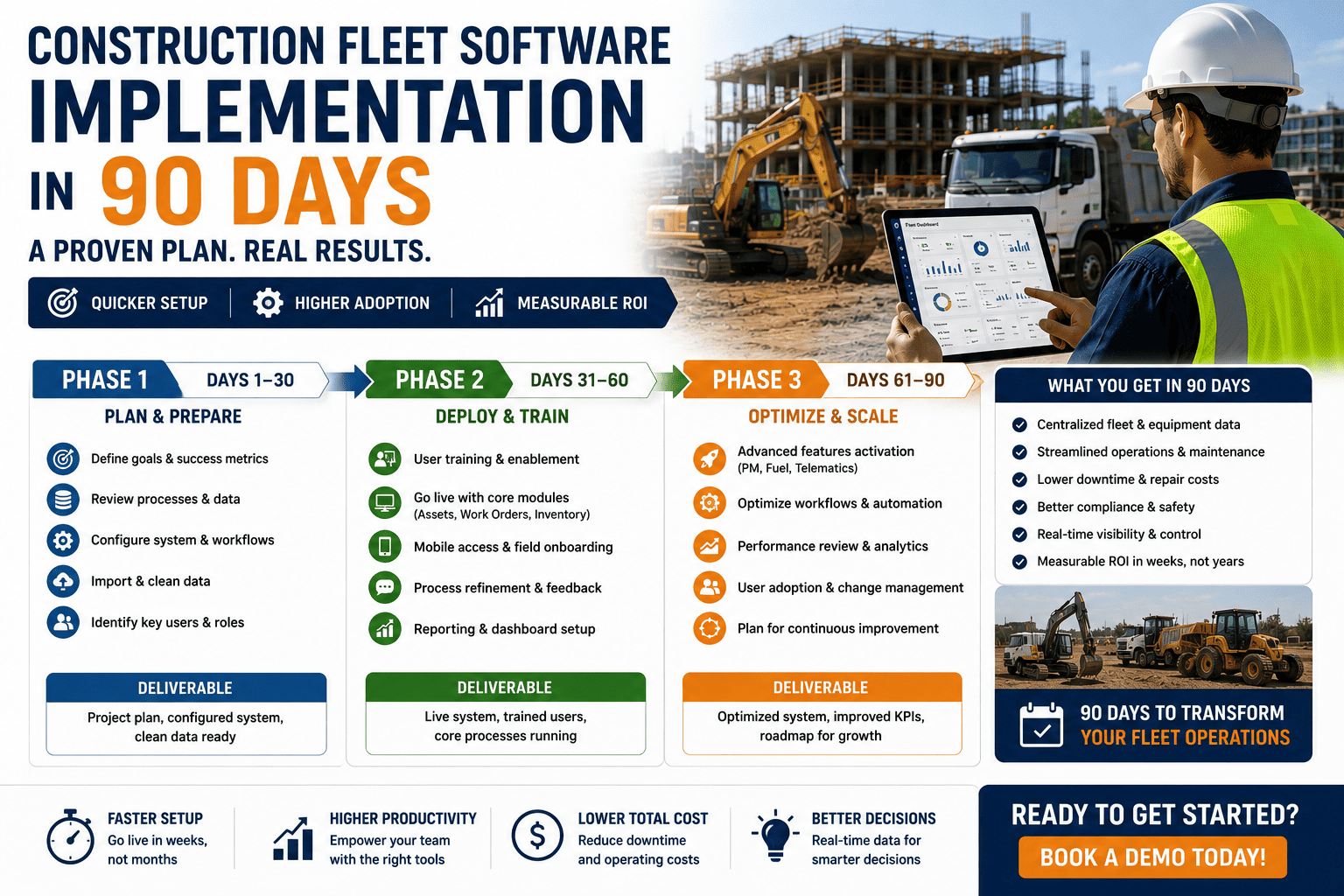
A construction fleet software rollout that works follows three phases across 90 days: foundation and data setup in days 1 to 30, a focused pilot on one job site in days 31 to 60, and full-fleet rollout with optimization in days 61 to 90. Fleets following this sequence typically reach 90 percent or higher inspection completion, cut work-order turnaround time in half, and hit 95 percent preventive maintenance compliance by the end of the first quarter.
Why Most Rollouts Stall Before They Start
Failed implementations almost never fail because the software couldn't do the job. They fail because of predictable, avoidable sequencing mistakes made in the first few weeks.
Full Rollout Before Any Testing
Deploying to every site and every user simultaneously means every workflow issue, every confusing screen, and every configuration mismatch surfaces at fleet-wide scale instead of being caught and fixed on one pilot site first.
Same Training For Every Role
Fleet managers, mechanics, and equipment operators use the system completely differently. Generic training that doesn't separate dashboard analytics from work-order management from mobile inspections leaves every group half-prepared.
Old Process Kept Running Alongside
Letting paper logs or spreadsheets keep operating next to the new system for months gives everyone permission to fall back on old habits, which is why adoption never crosses the finish line.
The Three-Phase, 90-Day Rollout
Each phase has a distinct objective and a hard boundary, so the rollout keeps moving instead of drifting indefinitely in "pilot mode."
Foundation And Data Setup
Audit the fleet, migrate 12 to 24 months of maintenance history, current asset records, and active preventive maintenance schedules. Configure inspection templates, alert thresholds, and work order routing before a single user logs in.
Focused Pilot And Training
Deploy to one project site — typically 15 to 30 assets and 10 to 15 users. Run daily check-ins during week one, then twice-weekly, adjusting configuration based on real feedback before expanding any further.
Full Rollout And Optimization
Expand to remaining sites using the workflows the pilot validated. Configure executive dashboards, automate weekly reporting, and measure results against the baseline set before go-live.
Fleets that want this timeline mapped against their own site count and equipment list, rather than a generic estimate, typically find it faster to book a demo and walk through an implementation plan built around their actual operation.
Training That Matches How Each Role Actually Works
Generic, one-size-fits-all training is one of the most common reasons adoption stalls after a technically successful pilot. Splitting instruction by role, and keeping each session short and specific, gets people using the system correctly from day one instead of guessing.
| Role | Training Focus | Typical Session Length |
|---|---|---|
| Fleet Managers | Dashboard analytics, PM scheduling, KPI reporting | 2 hours |
| Mechanics | Work order management, parts requests, service history | 1.5 hours |
| Equipment Operators | Mobile inspection completion, defect reporting | 1 hour |
Train On Real Data, Not A Demo Account
Sessions run on the company's actual equipment, actual project sites, and actual inspection templates land far better than a generic demo environment. Users engage more when they're seeing their own machines and their own workflows from the first session, not a hypothetical example fleet.
Naming An Internal Champion
The best platform still fails without someone internally accountable for adoption. Naming one person — with dedicated time carved out for the first quarter — to own rollout questions, coach lagging users, and report progress to leadership consistently separates the fleets that hit their 90-day targets from the ones that drift.
FleetRabbit's implementation team configures inspection templates, work order routing, and role-specific training around your actual fleet data — not a generic demo account — so every user is productive from their first login.
What "Successful" Actually Looks Like At Day 90
A rollout isn't complete just because the software is live. It's complete when the numbers move. Measuring pilot results against a pre-deployment baseline is what separates a real adoption success from a system that's technically installed but practically ignored.
Once a pilot site clears these targets, expanding to remaining sites carries far less risk — the workflows, training approach, and configuration have already been proven against real operational data. Contractors ready to set their own baseline can sign up and start the foundation phase before their next project kickoff.
FleetRabbit's implementation team handles data migration, role-based training, and pilot configuration so your fleet reaches measurable ROI in 90 days, not another failed attempt. See the exact deployment plan for your job sites.







