Picture the scene: a site superintendent needs a backhoe for three days of trenching. He calls the equipment manager, who checks a spreadsheet last updated four days ago and says it's at Project A. He calls Project A's foreman, no answer, they're mid-pour. Rather than wait, the superintendent rents one for 850 dollars a day. Three days later someone mentions the company already owned a backhoe sitting idle at Project C, twelve miles away, the whole time. This exact scene plays out on construction fleets every week, and it's the single biggest reason multi-site contractors overspend on equipment they already own.
Construction equipment moving across multiple job sites is tracked with GPS hardware, geofenced site boundaries, and engine-hour telematics feeding one live dashboard. Without it, utilization across distributed fleets commonly drops to 40 to 60 percent as equipment sits idle at the wrong site. Real-time tracking typically lifts utilization, cuts rental spend by 15 to 30 percent, and helps recover stolen equipment at far higher rates than untracked machines.
The Real Problem Isn't Losing Equipment, It's Losing Track of It
Very little construction equipment actually disappears for good. Most of it is simply sitting somewhere, idle, forgotten, or one job site away from where it's needed, while a nearby project pays full rental price for the exact same machine. Across distributed fleets, equipment utilization commonly runs between 40 and 60 percent, meaning a large share of your fleet is doing nothing on any given day, and nobody in the office can say exactly where or why.
Why This Gets Worse With Every Added Site
A single job site is easy to keep track of by eye. Add a second, third, and fourth active project, and equipment starts moving between sites, depots, and hire yards faster than any spreadsheet or phone call can keep up with. That's when assets go missing from the record, get double-booked across two crews, or sit unused on a site that finished needing them weeks ago.
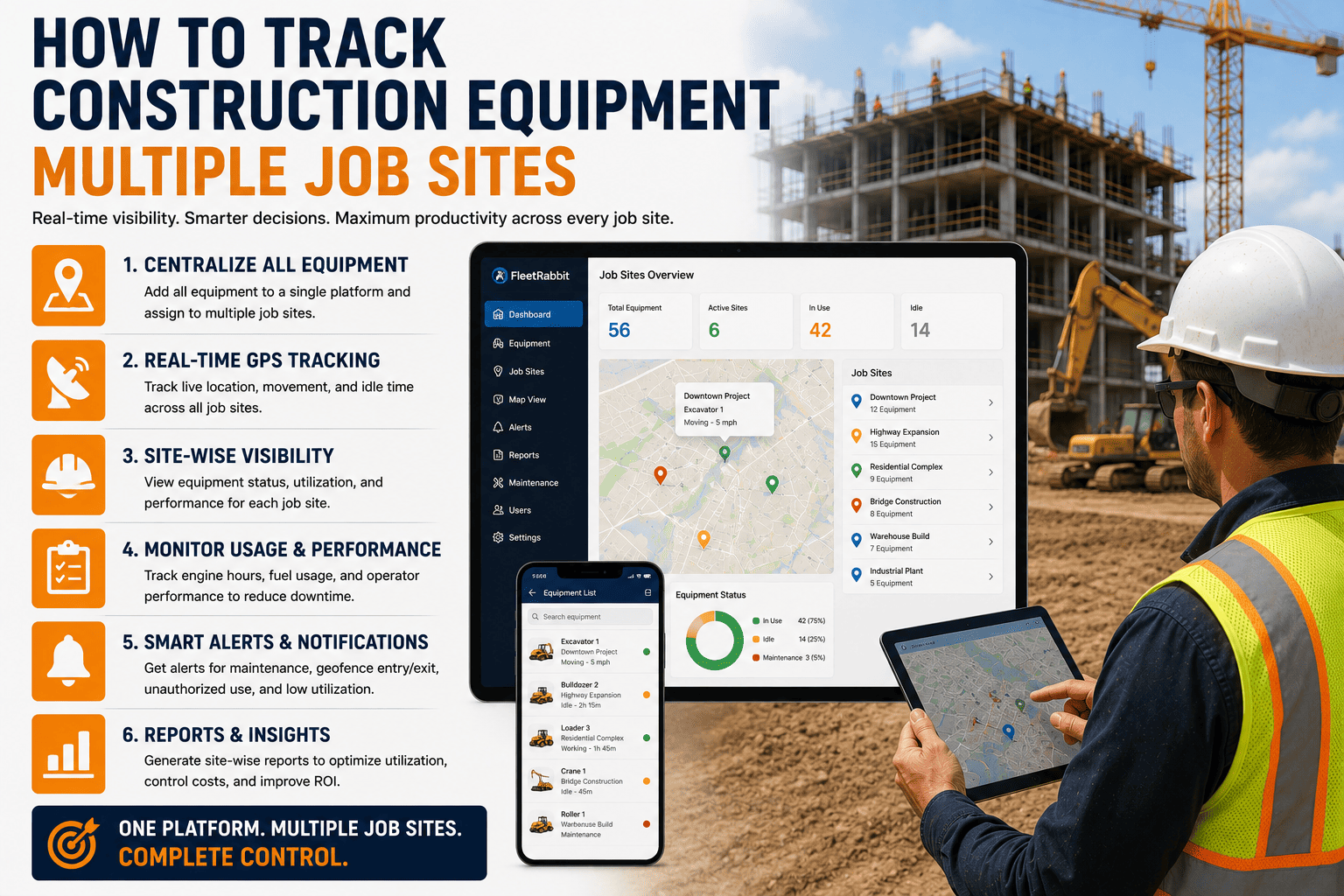
FleetRabbit shows every piece of equipment's live location, status, and engine hours across all your active sites in one dashboard, so an idle asset never gets mistaken for an unavailable one. Sign up free to map your fleet today, or book a demo to see cross-site tracking live.
What Actually Makes Multi-Site Tracking Work
Location alone isn't enough. A dot on a map tells you where a machine is, not whether it's being used, whether it's due for service, or whether it should be redeployed instead of leaving a nearby project to rent. Effective tracking combines three layers working together.
Live GPS Location
Every machine reports its position continuously, so any site manager or dispatcher can see exactly where a piece of equipment sits without a single phone call.
Geofenced Job Site Boundaries
Drawing a virtual perimeter around each active project automatically assigns equipment to that site when it arrives, tracks how long it stays, and flags any movement outside the boundary, especially after hours.
Engine-Hour and Utilization Data
Ignition status and engine hours reveal whether a machine that "looks busy" on the map is actually working or just parked with the key in it, which is the real number that drives smarter redeployment decisions.
Turning the Three Layers Into a Decision
When a foreman requests equipment, the system can check location, distance, and current utilization across every site at once, and recommend moving the closest idle unit instead of authorizing a same-day rental. That single check is often the difference between a 2500 dollar rental bill and a 280 dollar transport cost.
| Tracking Capability | What It Solves | Typical Impact |
|---|---|---|
| Real-Time GPS Location | Ends the phone-tag search for missing or misplaced equipment | Hours of admin time saved weekly |
| Geofencing and After-Hours Alerts | Flags unauthorized movement and unsecured overnight sites | Higher recovery rates on tracked equipment |
| Utilization Reporting | Reveals which owned equipment sits idle instead of being redeployed | 15 to 30 percent lower rental spend |
| Engine-Hour Maintenance Triggers | Replaces calendar-based guessing with usage-based service scheduling | Fewer surprise breakdowns on active sites |
| Cross-Site Dashboard | Puts every project's equipment status in one screen instead of scattered spreadsheets | Faster, better-informed dispatch decisions |
Setting Up Tracking Across Your Sites
Rolling out multi-site tracking doesn't require ripping out your existing process, it requires layering visibility on top of it.
Start With Your Highest-Value Assets
Equip excavators, loaders, and other high-value machines with GPS hardware first, since these are the units most likely to get double-booked or rented unnecessarily when their location isn't clear.
Draw Geofences Around Every Active Site
Set a boundary for each project the moment it kicks off, so equipment gets automatically logged in and out as it moves, rather than relying on someone remembering to update a spreadsheet.
Assign a Site Owner for Every Asset
Clear ownership at each location reduces the confusion that happens when equipment gets transferred informally between crews without anyone recording the move.
Handling Rented Equipment Alongside Owned Assets
Rentals coming in and out of the fleet create "ghost assets" that clutter the system if they're not tracked the same way. Temporary GPS tags or a simple check-in and check-out step keep rented and owned equipment on the same live record.
FleetRabbit compares distance, availability, and utilization across every site before a rental request goes out, so idle equipment gets moved instead of duplicated. Start free and connect your first site, or book a demo to see the cross-site dashboard.
Frequently Asked Questions
Every job site call to track down a missing machine costs time, and every unnecessary rental costs money you didn't need to spend. FleetRabbit puts your entire fleet on one live map so the right equipment gets to the right site automatically. Start free today or book a walkthrough with our team.







