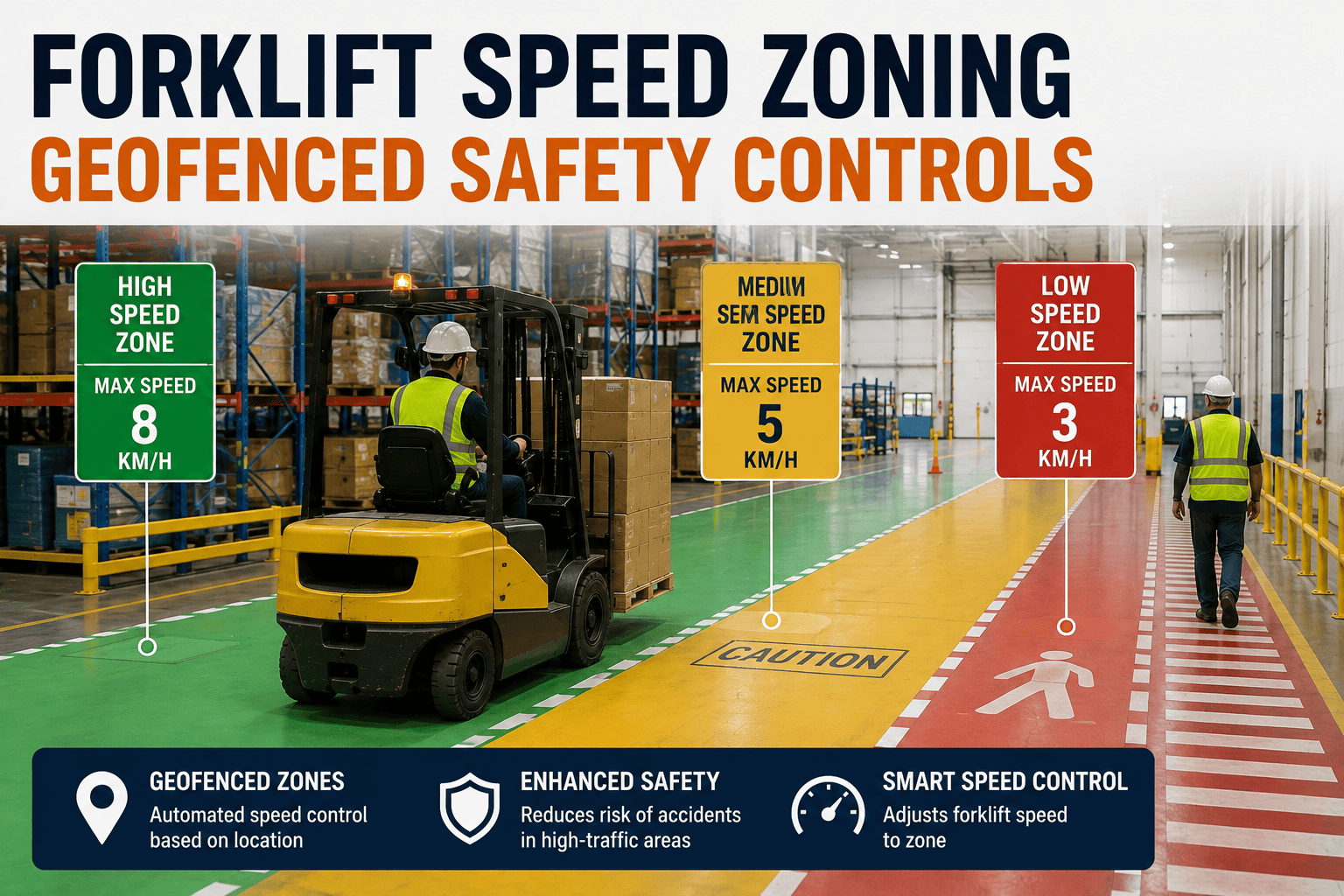
Not every part of a manufacturing floor carries the same collision risk. An open aisle in the middle of a warehouse can safely handle a forklift moving at a normal working speed, while a loading dock, a pedestrian crossing, or a blind intersection needs that same forklift moving significantly slower. A single site-wide speed limit can't account for that difference, which is exactly why zone-based speed control exists.
Geofenced speed zoning uses GPS or RFID technology to automatically adjust forklift speed based on exactly where the vehicle is on the floor, without relying on operators to remember and self-enforce different limits in different areas. This guide covers how zone-based speed control actually works and how FleetRabbit geofences plant zones so speed is controlled precisely where collision risk is highest.
Zone-based speed control uses geofencing technology to create virtual boundaries around high-risk plant areas, such as pedestrian walkways, loading docks, and blind intersections, each with its own enforced speed limit. Sensors and GPS continuously track forklift location, automatically slowing the vehicle as it enters a designated zone without requiring operator judgment. This targets collision risk exactly where it concentrates, rather than applying one blanket limit across a facility with very different risk levels from area to area.
How Zone-Based Speed Control Actually Works
Zone-based speed control combines location tracking with a control system on the forklift itself, so speed adjusts automatically the moment the vehicle crosses into a defined zone.
Geofences Define The Risk Zones
Virtual boundaries are mapped around the areas of the plant that carry the highest collision risk, pedestrian walkways, dock entrances, cross-aisles, and blind corners. Each zone gets its own speed profile based on an honest assessment of the hazard it presents.
Sensors Track Real-Time Location
GPS or RFID-based sensors on the forklift continuously report its position relative to the mapped zones. As the vehicle approaches or enters a zone boundary, the system knows immediately, without needing the operator to notice a sign or remember a rule.
The Control Unit Enforces The Limit
A control unit integrated with the forklift's throttle automatically adjusts maximum speed the moment the vehicle enters a zone, and restores normal speed once it exits. This removes the guesswork and the temptation to push speed in an area that looks clear but statistically isn't.
Enforce Speed Where Risk Actually Lives
FleetRabbit geofences your plant zones and automatically enforces the right speed limit in each one, so high-risk areas get real, consistent speed control without relying on operator memory.
Building A Zoning Plan For Your Facility
Setting up zone-based speed control isn't about restricting every inch of the floor, it's about matching enforcement to actual risk so productivity and safety both improve.
Start With A Risk Assessment, Not A Guess
Walk the floor and identify where pedestrian traffic, vehicle traffic, and limited visibility genuinely overlap. This is often different from where managers assume the risk concentrates, which is why a deliberate assessment matters more than instinct.
Set Zone-Specific Limits Based On Hazard Level
Docks, crossings, and blind corners warrant the tightest limits. Open aisles with clear sightlines can safely run faster without adding meaningful risk. Matching the limit to the actual hazard keeps productivity intact where it's safe to do so.
Automate Enforcement Instead Of Relying On Signage
Floor markings and posted limits help, but they depend entirely on operator compliance. Automated, geofenced enforcement removes that dependency and ensures the limit holds on every shift, with every operator, without supervision overhead.
Review Zone Boundaries As The Floor Changes
Layouts shift as production lines move, racking gets reconfigured, and new equipment comes online. Zoning plans should be reviewed periodically to make sure the geofenced boundaries still match where the actual risk sits.
Signs Your Facility Needs Zone-Based Speed Control
This is exactly the layer FleetRabbit adds to your floor. Plant zones are mapped and geofenced according to real risk, with automatic speed enforcement and logged zone activity giving safety teams a clear, ongoing view of compliance across every forklift and every shift. If your facility is still relying on posted limits and operator memory alone, it's worth seeing what automated zone enforcement looks like on your floor, and you can book a demo to walk through it.
Let Your Floor Layout Set The Speed, Automatically
FleetRabbit turns your plant's highest-risk zones into enforced speed boundaries, closing the gap between posted limits and what actually happens on the floor.
Frequently Asked Questions
Match Speed To Risk, Automatically, Every Shift
FleetRabbit geofences your plant's highest-risk zones and enforces the right speed limit automatically, closing the gap left by posted signs and operator memory alone.