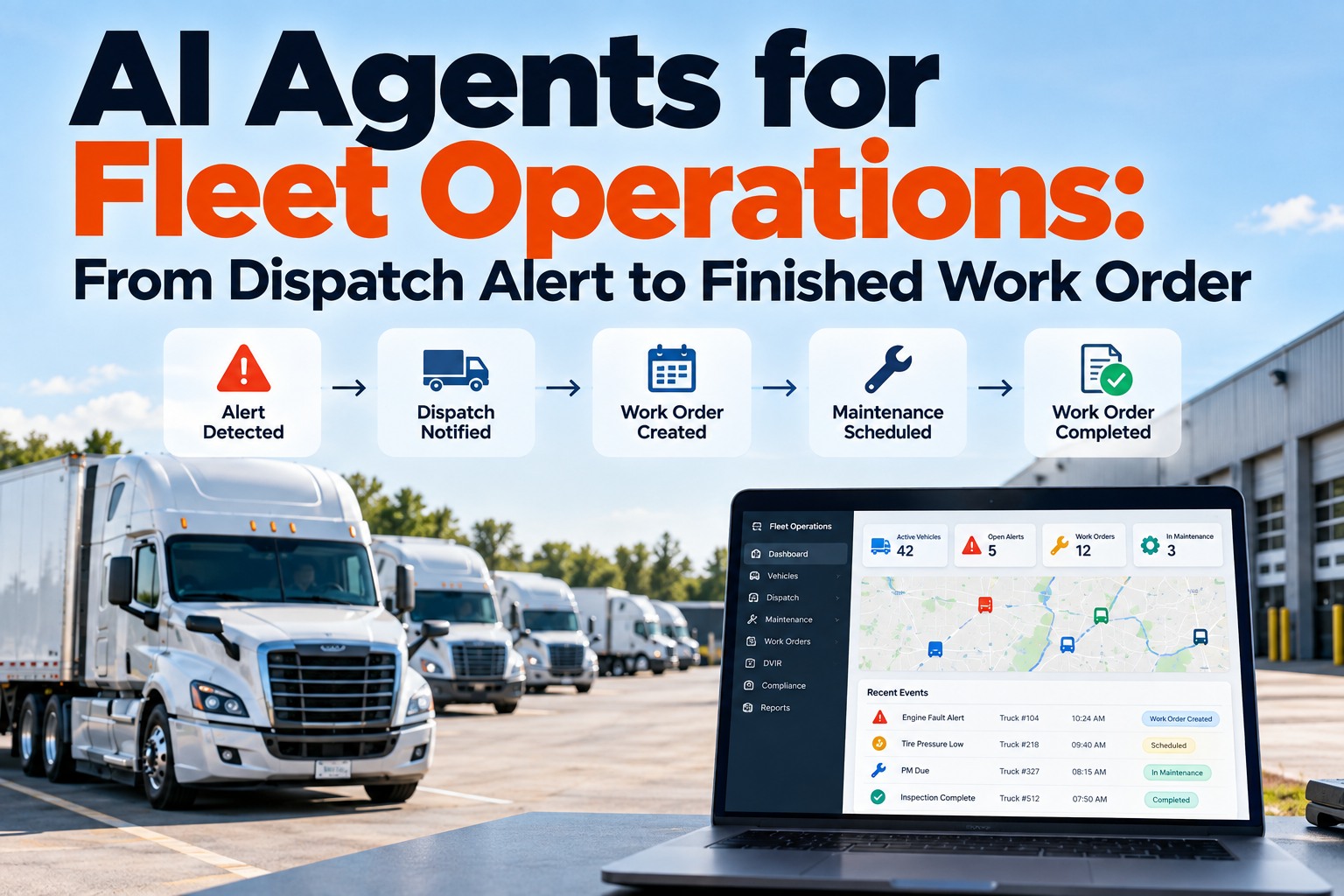
An AI agent for fleet operations is software that carries one event — a fault code, a driver defect report, a missed PM — from the moment it appears to a finished action, asking a person only where a human decision belongs. That is the difference from the tools most fleets already run: an app shows you a problem and waits, an automation fires one pre-set action and stops, and an agent works through the steps until the outcome exists or it needs approval. The market moved quickly in 2026: Samsara launched Agent Studio in June 2026 and Motive introduced its Automations product at Vision 26 in May 2026, both aimed at turning fleet data into completed work rather than dashboards. This guide sets out what agents can safely own, the three approval lanes that keep humans accountable, the workflows worth automating first, the guardrails to write before you enable anything, and a 30-day pilot plan. Book a 30-minute demo to watch an agent handle a defect on your own units, or start free with 3 vehicles.
AI agents · Dispatch and maintenance
Your Software Already Knows the Truck Has a Problem. It Just Waits for Someone to Do Something About It.
For fleet managers, maintenance leads and operations directors: what an agent should be allowed to finish on its own, what it should draft for approval, and what stays a human decision.
What Separates an AI Agent From the Apps and Automations You Already Run
Fleets have had alerts for years, and most managers have more of them than they can act on. The useful question isn't whether software can detect something — it's who does the next eleven steps. You can see the difference on your own units with a free account. Swipe the table on mobile.
| App or dashboard | Rule-based automation | Agent | |
|---|---|---|---|
| Who notices the event | A person checking a screen | The system, on a fixed rule | The system, watching continuously |
| What it does next | Shows it | Fires one pre-set action | Works through the steps toward an outcome |
| Handles missing information | Waits for a person | Fails or does nothing | Asks, looks it up, or flags what it needs |
| Handles exceptions | Person decides | Rule breaks | Escalates with what it already did |
| Who is accountable | The person | The person who wrote the rule | The person who approves the step |
The accountability row is the one that matters for adoption: agents don't remove responsibility, they move it to the approval step.
The Three Approval Lanes That Decide What an Agent May Finish Alone
Write these three lanes down before enabling anything, and every later argument about what the agent should do becomes a question of which lane a task belongs in. Most failed rollouts skip this and either let an agent touch safety decisions or make it ask permission for everything until nobody uses it. We'll assign your own workflows to these lanes during the demo.
Matching a fault code to the right unit, attaching history to a work order, notifying the assigned shop, updating a due date
Drafting a work order with parts and labor, proposing a unit swap, booking a vendor slot, setting a repair priority
Taking a truck out of service, certifying a repair, signing a DVIR, log edits, anything a driver is accountable for
The lane assignment is the product decision
An agent that drafts a work order and waits saves a maintenance planner twenty minutes and risks nothing. An agent that takes a truck out of service on its own creates a liability nobody wants to own. Same technology, completely different exposure — decided entirely by which lane you put the task in.
The Tap-Heavy Moments Where Fleet Workflows Actually Break Down
Agents earn their place in the gaps between systems, not inside them. Each of these is a place where information already exists but a person has to carry it somewhere. Start closing these gaps free on 3 vehicles.
A fault arrives, and someone opens three systems to find the unit, its history and whether it is already in the shop.
A driver reports something, and it waits in a queue until a planner types it in again.
A PM comes due while the truck is on a load, and the conflict sits unresolved until it becomes a missed PM.
The work gets done, but parts, labor and verification land in different places, so the next fault starts from nothing.
Four Fleet Workflows Where Agents Pay Back Fastest
Start where the steps are repetitive, the data already exists, and a mistake is cheap to reverse. These four meet all three tests, and each one keeps the approval gate in the right place. We'll pick your first workflow together in a demo.
The agent matches the code to the unit, pulls the repair history and open defects, scores severity against your rules and drafts the work order.
Lane two: drafts, you approveReported defect, photo and location land on the DVIR and a work order with the shop notified and the next driver warned if the unit has an open safety defect.
Lane one and twoWhen a PM comes due mid-load, the agent finds the next realistic window and proposes it to both planners rather than letting it slip.
Lane two: drafts, you approveThe agent chases the missing fields, links the parts used and flags a repeat of the same code within 30 days.
Lane one: completesWhat the demo actually covers
- One of your real defect reports, run end to end
- Your approval lanes set up as rules, not slides
- The work order the agent produces, with history attached
- What a human sees, and where they have to sign off
What Fleet Software Vendors Actually Shipped in 2026
This stopped being a concept year in 2026. Samsara announced Agent Studio in June 2026, and Motive introduced Automations at its Vision 26 event in May 2026 — both built around the same idea of turning fleet signals into completed work. That matters for buyers in two ways: capability is arriving quickly, and the questions worth asking a vendor have changed. Try the workflow yourself free.
Ask for the list, not the philosophy. If the vendor can't name lane one, there isn't one.
Every action that spends money or moves a truck should show you what it intends to do first.
Who approved what, when, and what the agent saw at the time.
Reversal path, escalation rule, and whether the error shows up in your records.
The Guardrails to Write Before You Switch Any Agent On
Agents are safe when the boundaries are explicit and boring. Six rules cover most of it, and each one belongs in writing before the pilot, not after the first surprise. We'll help you draft these in the demo.
What Faster Hand-Offs Are Worth in Downtime Terms
The case for agents isn't headcount — it's the hours between a problem appearing and a repair being scheduled. Industry benchmarking puts unplanned downtime at roughly $448 to $760 per truck per day before towing and repair, CCJ reports unplanned repairs costing $700 to $1,500 in lost revenue per day, and Volvo and Mack report cutting breakdown diagnosis time by 70% with remote data. ATRI puts 2025 repair and maintenance cost at $0.215 per mile, up 8.6%. Track your own hand-off times free.
Directions to look for in your own baseline, not promised results.
A 30-Day Pilot Plan That Proves the Agent Before You Scale It
Run it narrow and measurable. One workflow, one terminal, one approver, and a baseline taken before anything changes. Start the pilot free on 3 vehicles.
Measure today's hand-off times and write the lane assignment for the one workflow you'll pilot.
The agent proposes, a person approves everything. Watch what it gets right and where it hesitates.
Let the agent finish the reversible steps on its own; keep approvals on anything that spends or moves.
Compare against the baseline, review the audit trail, then scale or stop.
AI Agent Questions Fleet Managers Ask Before a Pilot
What is an AI agent in fleet operations?
Software that carries an event — a fault code, a defect report, a missed PM — through the steps to a finished action, asking a person only where a human decision belongs, rather than showing an alert and waiting. See one handle a defect on your units.
How is that different from automation we already have?
Rule-based automation fires one pre-set action and stops when anything is missing. An agent works toward the outcome, gathers what it needs and escalates when it can't finish. Compare both on 3 vehicles free.
What should an agent never decide on its own?
Taking a truck out of service, certifying a repair, signing a DVIR, editing hours-of-service logs, and anything a driver or mechanic is personally accountable for. Those stay in the human lane. Set your lanes with our team.
How do we keep control of spending?
Set a value above which the agent may only draft, never act, and require a named approver. Every drafted action should show what it intends to do before it happens. Try approval gates free.
What happens when the agent gets something wrong?
You need a one-step reversal for anything in the self-complete lane, an escalation rule when data conflicts, and an audit trail showing what it saw and who approved it. Review the audit trail in a demo.
Where should we start?
With a reversible, repetitive workflow such as fault triage or defect intake, run in draft mode for two weeks with a measured baseline before releasing anything to run on its own. Start your pilot free.
Watch an Agent Take One Defect From Report to Approved Work Order
Bring a week of fault codes or driver defect reports. In 30 minutes we'll run one through FleetRabbit end to end, show what the agent completes on its own, what it drafts for you, and exactly where your approval sits.
No credit card required. Nothing runs unsupervised until you say so.