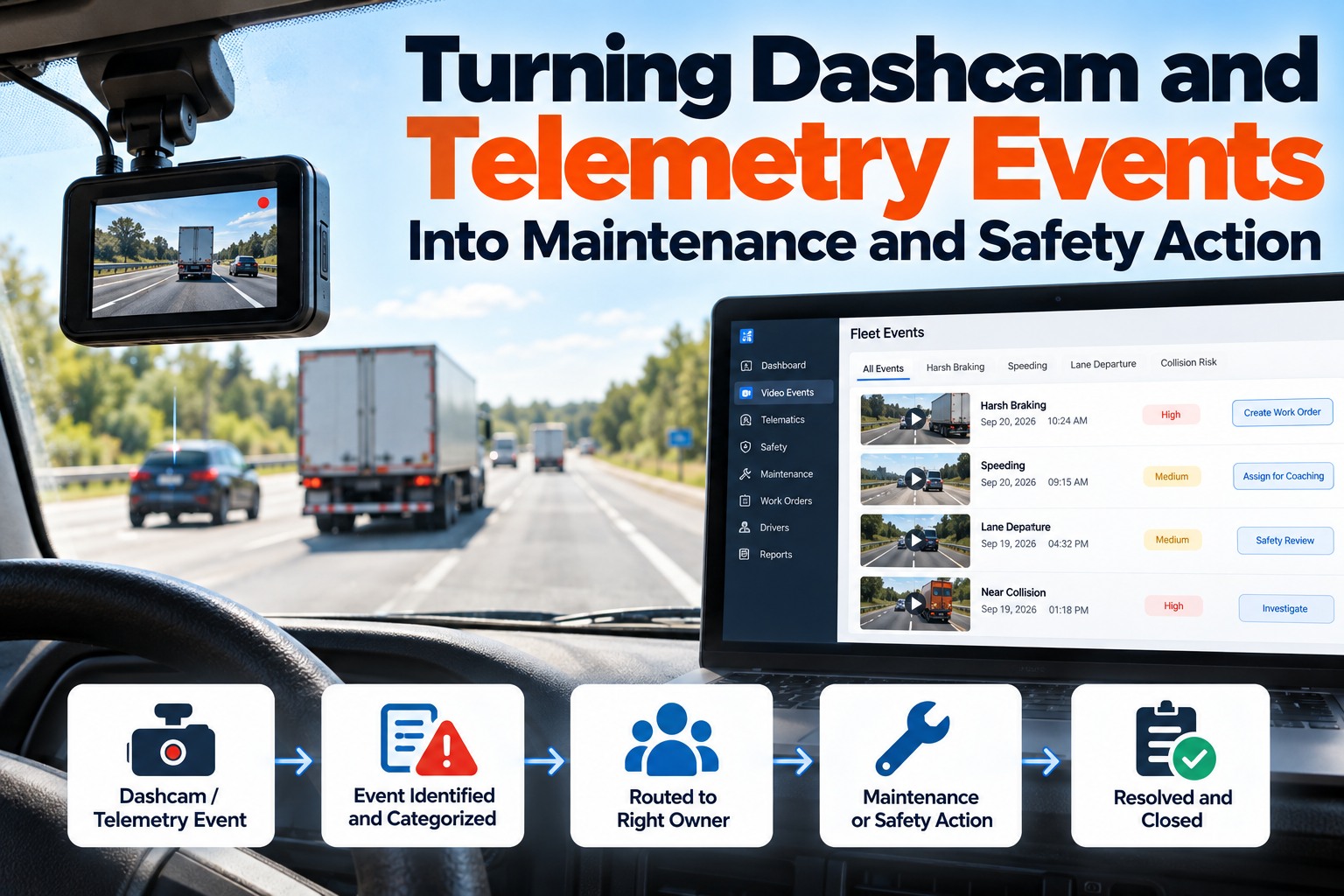
Fleet dashcams and telematics produce more events than any safety team can watch, and the gap between recording and reviewing is where the value leaks away. The fix isn't watching more video — it's deciding in advance where each type of event goes, who owns it and when it is due, so a harsh-braking event with a brake fault code becomes a work order while a following-distance pattern becomes a coaching session. Verizon Connect's 2024 fleet survey found 70% of fleets consider in-cab video extremely or very beneficial, and about 52% of medium fleets already use it, so the equipment is rarely the constraint. This guide gives you a routing table, an evidence clock, the roadside violations worth matching to camera signals and a rollout that doesn't end in sensitivity being turned down. Book a 30-minute demo to see your own events routed into work orders, or start free with 3 vehicles.
Video telematics · Event routing
Nobody Has Time to Watch the Footage. The Question Is Where Each Event Should Land Without Anyone Watching.
For safety directors, fleet managers and maintenance leads: a routing model that turns camera and telematics events into coaching tasks, work orders and protected evidence — with an owner on every one.
The destination is decided before the event happens, not after someone opens the clip.
Why Camera Programs Stall Between Recording Events and Acting on Them
Adoption is no longer the hard part. Verizon Connect's 2024 survey reported that 70% of fleets see in-cab video as extremely or very beneficial and that roughly 52% of medium fleets use it, yet most programs still route everything into one review queue. A queue with no owner and no due date is where good footage goes to expire. You can set destinations per event type on a free account.
Every added camera and sensitivity setting multiplies events, while the review team stays the same size.
An event in a shared inbox belongs to nobody, and the ones that matter sit beside the ones that don't.
A harsh-braking cluster on one unit is often a brake problem, not a driver problem.
Where Each Type of Camera and Telematics Event Should Go, and Who Owns It
This is the artifact worth writing down. Agree it once with safety, maintenance and operations, and every later argument about an event becomes a question of which row it is. We'll build this table with your own event types in a demo. Swipe the table on mobile.
| Event | Destination | Owner | Due | What good looks like |
|---|---|---|---|---|
| Collision or hard impact | Evidence hold | Safety manager | Immediately | Clip locked, work order for damage inspection |
| Following distance, repeated | Coaching task | Driver coach | Within the week | Grouped by driver, not clip by clip |
| Harsh braking with a defect code | Maintenance | Shop lead | Same day | Work order on brakes or aftertreatment |
| Camera obstruction or offline | Device fix | Fleet admin | Within 48 hours | A camera nobody fixes records nothing |
| Speeding by policy threshold | Coaching task | Driver coach | Weekly review | Pattern matters more than a single event |
| Idle or PTO time above threshold | Maintenance trend | Maintenance planner | Monthly | Feeds hour-based PM triggers |
| Low-severity motion alerts | Log only | No owner | Never | History, not an alert |
A starting model, our assessment — tune the thresholds to your own fleet after 30 days of data.
The Evidence Clock Most Fleets Only Discover After a Crash
Camera storage falls into three categories, and only one of them survives long enough to matter in a claim. Saved event clips are kept; continuous footage is overwritten on a rolling basis; and anything the system never flagged was never saved at all. That is why a collision belongs in an evidence lane that locks the clip immediately, not in a review queue. Set an evidence hold rule free on 3 vehicles.
Flagged by the system or a person. Available when someone asks weeks later.
Rolling storage on the device. Valuable for days, then gone.
If no trigger fired and nobody requested it, there is nothing to retrieve.
Decide the evidence rule before you need it
Any collision, injury or third-party claim should automatically lock the clip, the surrounding footage and the telematics data for that window, and open a damage inspection work order on the unit. Doing it after the phone call from a claims adjuster is usually too late.
The Roadside Violations Your Camera Data Can Help You Catch Early
At CVSA's 2025 International Roadcheck, 18.1% of vehicles inspected were placed out of service, with brake systems at 24.4% and tires at 21.4% of vehicle violations. Camera and telematics signals won't inspect a brake lining, but repeated harsh braking, hard-corner events and idle patterns point at the units worth inspecting first. We can map your event data to these categories in a demo.
Repeated harsh-braking events on one unit, or braking events clustered with aftertreatment and ABS codes.
Hard-corner and stability events plus tire pressure telematics flag units for a wheel-end inspection.
Not a camera signal — but the DVIR defect it produces belongs on the same work order queue.
Share of vehicle out-of-service violations, 2025 International Roadcheck. Source: CVSA.
Bring one week of events to the demo
We'll sort them into evidence, coaching, maintenance and log-only, then show the work orders and coaching tasks that would have been created automatically.
Rolling Out Event Routing Without Ending Up Turning the Sensitivity Down
Almost every failed camera program ends the same way: the alerts get overwhelming, someone lowers the sensitivity, and the system stops catching the events it was bought for. Route first, then tune. Start with one destination free.
Count events by type per 100 trucks. That number is your review capacity problem in one figure.
Fill in the routing table with names, not departments, and set due times.
Only adjust thresholds after two weeks of routed events, never in the first busy week.
Compare events actioned, coaching completed and work orders created against the baseline.
The Numbers That Prove Event Routing Is Working
Four measures tell you whether events are becoming action. The cost side is why it matters: industry benchmarking puts unplanned downtime at roughly $448 to $760 per truck per day before towing and repair, and a maintenance signal caught in a camera event is one that didn't become a roadside call. Set your baseline with our team.
Dashcam and Telematics Routing Questions Fleets Ask Most
Do we have to review every dashcam event?
No, and trying to is what breaks most programs. Decide in advance which event types go to evidence, coaching, maintenance or log-only, and review by exception rather than clip by clip. See routing on your own events.
Which camera events are really maintenance problems?
Repeated harsh braking on one unit, stability and hard-corner events, and idle or PTO time above threshold. Each should open or influence a work order rather than a coaching session. Track them per unit free.
How long is dashcam footage kept?
Saved event clips are retained, continuous footage is overwritten on a rolling basis, and anything never flagged was never stored. Lock evidence immediately after any collision or claim. Set evidence rules with us.
How do we stop alert fatigue?
Route before you tune. Give every event type a destination, an owner and a due time, send low-severity events to history, and adjust thresholds only after a few weeks of routed data. Start routing free.
Does FleetRabbit supply cameras?
No. FleetRabbit works with the camera and telematics providers you already run and turns their events into inspections, work orders and records on the unit's history. Check your provider with us.
Give Every Camera Event a Destination, an Owner and a Due Time
FleetRabbit takes events from the cameras and telematics you already run, routes them by your own rules, opens inspection and repair work orders where they belong, and keeps the record on the unit.
No credit card required. Works with your existing cameras.