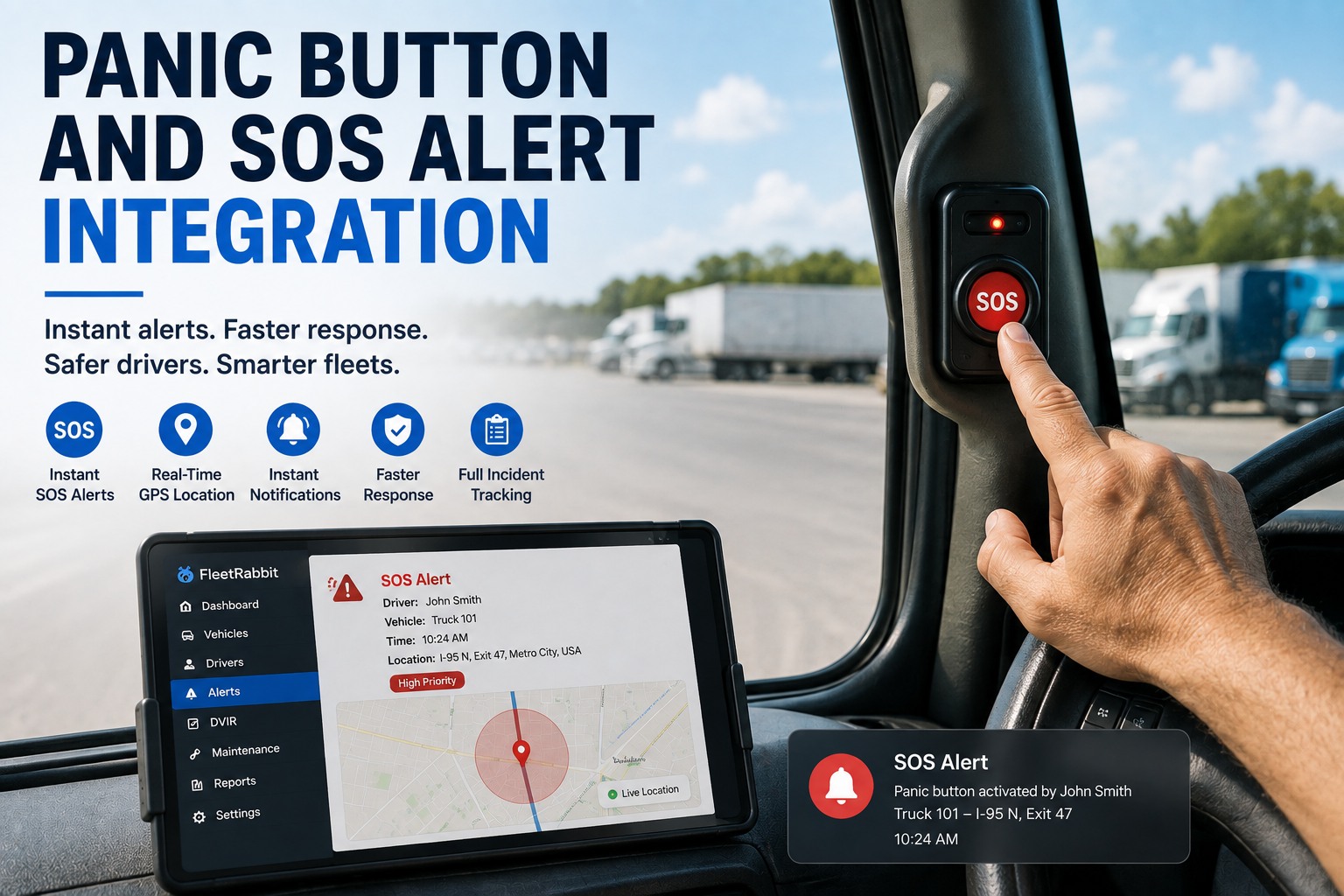
When a driver hits a panic button, seconds matter — and the button does its job brilliantly: one press sends an instant SOS with GPS location to dispatch, a silent alarm can summon help without alerting an attacker, and a duress code can quietly signal danger while everything looks normal. For a workforce that spends its day alone on the road — where transportation incidents account for well over a third of all workplace fatalities — that lifeline is essential. But the alert is only the first thirty seconds of a much longer story. Who acknowledged it? What was the response? Was it logged with a timestamp for the incident report? Is it tied to the vehicle's inspection and maintenance history for the investigation and audit that follow? Too often the panic-button alert lives in one portal, the incident log in a spreadsheet, and the vehicle's maintenance record somewhere else entirely. FleetRabbit brings panic button alerts together with DVIR, preventive maintenance, and compliance in a single view — so an emergency becomes a documented, audit-ready record instead of a scattered set of tabs. This page shows how the alert works, what happens after, what connects, and why one view beats many. Start free with 3 vehicles or book a demo to see panic button alerts in one view.
INTEGRATION · DRIVER SAFETY & COMPLIANCE
Panic Button and SOS Alert Integration for Drivers
Stop switching between portals. FleetRabbit brings panic button alerts together with DVIR, preventive maintenance, and compliance in a single view — so a driver's emergency becomes a documented, audit-ready record, not a scattered set of tabs.
36.8%of workplace deaths are transport-related
1-touchinstant SOS with GPS location
700+transit agencies under assault directive
How a Panic Button Alert Works
Modern SOS systems do far more than sound an alarm. Understanding what the alert carries is the starting point, because that data is what FleetRabbit turns into a documented incident record.
One-Touch Trigger
A single press — physical button, wearable, or app — instantly activates the alert. No dialing, no explaining, works even when raising an alarm out loud isn't safe.
Location & Context Sent
The alert transmits precise GPS coordinates and a timestamp to managers, security, or dispatch over cellular or satellite — and can attach dash-cam footage where equipped.
Silent & Duress Options
A silent alarm summons help without alerting an aggressor, and a duress code looks like normal use while covertly signaling danger — critical for hijack or assault situations.
The Alert Is the First 30 Seconds — Not the Whole Incident
A panic button is exceptional at the moment of crisis. But an emergency doesn't end when the alert is sent — that's when the paperwork, the investigation, and the accountability begin. Who acknowledged the alert, and how fast? What was the response and its outcome? Is every alert logged with a timestamp for the incident report a regulator or insurer will ask for? Is it connected to the vehicle's inspection and maintenance history for the investigation that follows a collision or breakdown? A standalone panic-button portal captures the alarm but not the lifecycle around it — and a scattered set of tools is exactly what fails under audit. FleetRabbit closes that gap, turning each alert into a logged, documented, audit-ready incident record tied to the driver, the vehicle, and its maintenance history — all in one view.
See how an alert becomes a documented record.
Before and After the Alert, in One View
The value of unifying panic alerts with maintenance and compliance is that the whole incident lifecycle — not just the alarm — lives in one place. Here's the difference.
Scattered: Portal-Hopping
Alert fires in a standalone panic-button portal
Incident logged by hand in a spreadsheet
Vehicle history sits in a separate maintenance tool
Compliance report assembled under audit pressure
Unified: One View
Alert lands in FleetRabbit with GPS and timestamp
Incident logged automatically with the record
Tied to the vehicle's inspection & maintenance history
Audit-ready compliance trail built as it happens
An alert nobody logged is an emergency you can't prove you handled.
FleetRabbit captures every panic alert with its location, timestamp, response, and vehicle history in one audit-ready record. Start free with 3 vehicles or book a demo to see it.
Safety That Also Satisfies the Regulators
Driver-safety technology increasingly isn't optional — it's expected by regulators and insurers. Documenting that your panic alerts were received and acted on is where a unified record matters.
OSHA General Duty Clause
Employers must identify and mitigate recognized hazards — including workplace violence and lone-worker risk. A documented alert-and-response trail demonstrates that mitigation is real, not just written policy.
FTA Transit-Worker Directive
A 2024 federal directive requires more than 700 transit agencies to assess and mitigate assaults on transit workers, as major assault rates have climbed sharply. Logged panic alerts feed that safety-risk documentation.
State & Regional Mandates
Several states mandate panic buttons in specific sectors, and regions with commercial-vehicle rules require them on public and commercial fleets. FleetRabbit keeps the proof they're installed and functioning.
Insurer Expectations
Documented incident response measurably changes claim outcomes. A complete, timestamped record of how an emergency was handled supports legitimate claims and defends against disputed ones.
What Connects Between Panic Alerts and FleetRabbit
The integration passes the alert, location, and incident data that matters for response and compliance, and puts each to work. Swipe the table horizontally on mobile.
← Swipe to see all columns →
Bring Panic Alerts Into One View With FleetRabbit
Connect your panic button and SOS system to FleetRabbit and see the whole incident on one screen — every alert logged with GPS and timestamp, response documented, footage linked, and the vehicle's maintenance history tied in for the investigation. Stop switching between portals and make every emergency an audit-ready record. At $5/vehicle/month, no hardware, live within 72 hours, free for up to three vehicles.
Every alert logged
Response documented
Footage & history linked
One compliance trail
Built for the Fleets Where Safety Is Non-Negotiable
Panic buttons matter most where drivers are alone, exposed to the public, or carrying vulnerable passengers — and those are the fleets where a documented response record pays off fastest.
Transit & School Buses
With rising assault rates and a federal directive to mitigate them, transit and school-bus fleets need documented alert-and-response records to satisfy safety-risk requirements.
Long-Haul & Lone Drivers
Drivers alone on remote routes face medical, security, and breakdown risk with no one nearby. A logged SOS trail proves the fleet took its duty-of-care seriously.
Taxi, Rideshare & Delivery
Public-facing drivers handling cash and passengers face elevated assault and theft risk. Silent and duress alerts plus a documented trail protect drivers and the operator alike.
Why One View Beats Scattered Tools
A panic button protects the driver in the moment. Unifying it with maintenance and compliance is what protects the driver, the record, and the operator through everything that comes after.
The Whole Incident, Not Just the Alarm
Alert, response, footage, and the vehicle's history in one record means the full story of an emergency is captured — not just the moment the button was pressed.
Nothing Lost Between Portals
When the alert, the incident log, and the maintenance record share one view, nothing slips through the gaps that scattered tools and spreadsheets create.
Audit- and Claim-Ready
A complete, timestamped record of how every emergency was handled answers a regulator, insurer, or investigator from a single, defensible source.
Keep the SOS System You Have
You don't replace your panic buttons — you connect them. The devices keep protecting drivers while FleetRabbit adds the documentation and compliance layer.
Frequently Asked Questions
What does the panic button integration with FleetRabbit do?
It connects your panic button and SOS system to FleetRabbit so each emergency alert becomes a documented, audit-ready incident record. The alert's GPS location and timestamp are logged, the response and acknowledgement are captured, any dash-cam footage is linked, and the incident ties to the vehicle's inspection and maintenance history — all in one view instead of scattered across a panic-button portal, a spreadsheet, and a separate maintenance tool. Seeing that unified incident record on your own fleet is what you can
book a demo to do, or you can
start free with 3 vehicles and try it directly.
Does FleetRabbit replace my panic button system?
No — it complements it. Your panic buttons and SOS devices are best at one critical thing: getting an instant emergency alert with location to the right people the moment a driver needs help. FleetRabbit is the platform that handles everything after the alert — logging it, documenting the response, linking footage, and tying it to the vehicle's maintenance record for the investigation and audit. You keep the SOS hardware protecting your drivers and add the documentation layer, which you can
book a demo to see in practice.
How does this stop me switching between portals?
By pulling the panic-alert data into the same view as your maintenance and compliance workflows. Instead of an alert firing in a standalone panic-button portal, the incident logged by hand in a spreadsheet, and the vehicle's history sitting in a separate maintenance tool, everything lands in one FleetRabbit view — the alert, its location and timestamp, the response, and the vehicle record together. That single pane is what turns a scattered emergency into one documented record, which you can
book a demo to walk through, or
start free with 3 vehicles to set up yourself.
Does it capture silent alarms and duress codes?
Yes. Many SOS systems support silent alarms that summon help without alerting an aggressor, and duress codes that look like normal use while covertly signaling danger — both vital in hijack or assault situations. When those events connect to FleetRabbit, they're logged as flagged incidents on the vehicle record with their location and timestamp, so even a covert alert becomes part of the documented, reviewable trail. Seeing how silent and duress events are captured is something you can
book a demo to explore.
How does this help with compliance and audits?
Driver safety is increasingly a regulatory expectation — OSHA's General Duty Clause requires mitigating recognized hazards including workplace violence, a federal directive requires hundreds of transit agencies to address worker assaults, and several regions mandate panic buttons outright. FleetRabbit keeps a complete, timestamped record of every alert and how it was handled, tied to the vehicle's maintenance history, so an audit or insurance request is answered from one defensible source rather than reconstructed from scattered tools. Seeing that compliance trail assembled is something you can
book a demo to review.
Can it link panic alerts to the vehicle's maintenance history?
Yes — and that's a key advantage for investigations. When an emergency involves a collision or breakdown, the investigation needs to know the vehicle's condition, its recent inspections, and its repair history. Because FleetRabbit already holds all of that, connecting the panic alert to the same platform means the incident and the vehicle's maintenance record are one click apart, not in separate systems. That connected view makes post-incident investigation and claims far faster, which you can
book a demo to see, or
start free with 3 vehicles to try.
Which fleets benefit most from this?
Any fleet whose drivers work alone, face the public, or carry vulnerable passengers. Transit and school-bus fleets face rising assault rates and a federal mandate to address them; long-haul and lone drivers face medical, security, and breakdown risk far from help; and taxi, rideshare, and delivery drivers handling cash and passengers face elevated assault and theft risk. In all of them, a documented alert-and-response record protects both the driver and the operator, which you can
book a demo to see configured for your operation.
How quickly can we get started?
Fast — FleetRabbit goes live within 72 hours with no hardware to install, running on devices your team already has, so once your panic-alert data connection is configured you can start turning emergency alerts into documented records quickly. You keep your existing SOS buttons and devices and simply add the incident-documentation and compliance layer on top, with no rip-and-replace. It's free for up to three vehicles, so you can
start free with 3 vehicles today, or
book a demo to map how your alerts should flow into your incident and compliance workflow first.
Make Every Emergency a Documented Record
Connect your panic button and SOS system to FleetRabbit and bring alerts together with DVIR, preventive maintenance, and compliance in a single view — every alert logged with location and timestamp, response documented, and the vehicle's history tied in for the investigation and audit that follow. Stop switching between portals and protect drivers with a record you can prove. Integrated in 5–7 working days, at $5/vehicle/month, free for up to three vehicles, with no hardware required.
Free tier for up to 3 vehicles · No credit card required · No hardware installation
August 10, 2026By Derek Goes
All Blogs