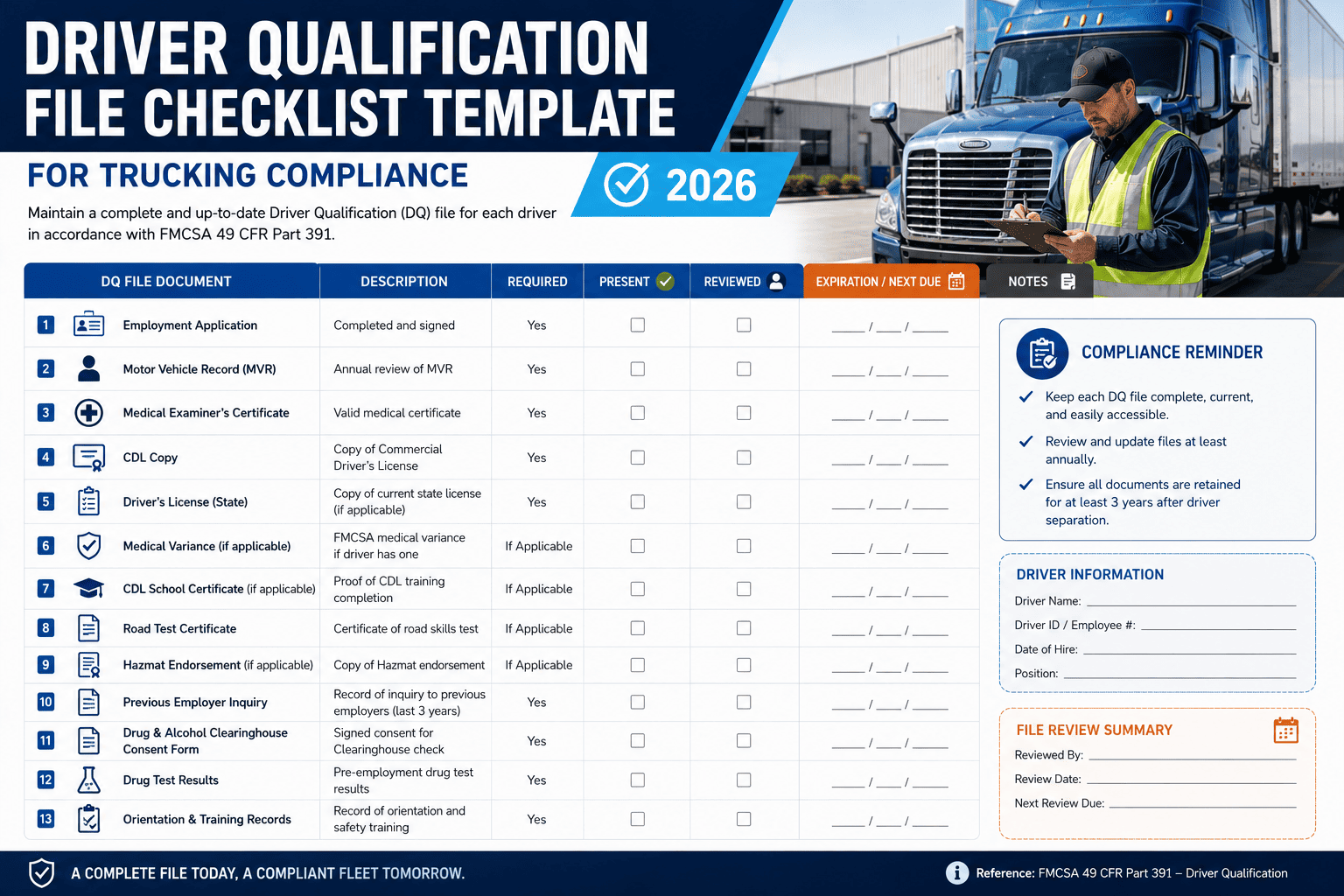
Ask any DOT auditor which file they pull first during a compliance review, and the answer is almost always the same: the driver qualification file. It's the document that proves you actually checked whether the person behind the wheel is legally allowed to be there, and a single missing page can turn a routine audit into a costly violation.
Driver Qualification File violations remain one of the most common findings in FMCSA compliance reviews, and a single missing document can average thousands of dollars in fines per occurrence. This guide breaks down exactly what belongs in a compliant DQ file for 2026, organized by when each document is due, so you can build a checklist your team actually follows. You'll also see how FleetRabbit turns this into an automated system instead of a filing cabinet you dread opening before an audit.
Driver qualification file issues account for a large share of all FMCSA violations, and expired medical certificates remain the single most cited DQF failure every year. Building your file around clear hire-date, 30-day, and annual checkpoints is the fastest way to close that exposure for good.
What a Driver Qualification File Actually Proves
A driver qualification file is not paperwork for paperwork's sake. It is your documented evidence that a specific driver meets every federal requirement under 49 CFR Part 391 before they ever get behind the wheel of a commercial motor vehicle, and that you continue verifying that qualification throughout their employment. The carrier maintains the file, and the carrier is the one who gets cited when it's incomplete, regardless of whether the driver is full-time, part-time, seasonal, or an owner-operator leased under your authority.
Who Needs a File
Every person who operates a commercial motor vehicle under your DOT number needs a complete DQ file, including drivers from staffing agencies and mechanics who occasionally move vehicles on public roads. There is no informal exception for "just filling in for a week."
The Complete DQF Checklist by Timeline
The easiest way to keep a file audit-ready is to organize it by when each document becomes due, rather than trying to remember every regulation citation. Here is the practical breakdown.
A note on retention after separation
Every driver qualification file must be retained for as long as the driver is employed and for three years after separation. Deleting a former driver's file too early is itself a violation waiting to be discovered.
FleetRabbit tracks every medical certificate, MVR, and Clearinghouse query expiration automatically and alerts you before anything lapses. You can sign up for a free trial and load your driver files in minutes, or book a demo to see exactly how it flags gaps before an auditor does.
Where Most Fleets Get Cited
The same handful of mistakes show up in DQF violations year after year, and nearly all of them are preventable with a simple tracking habit rather than a compliance overhaul.
| Common Violation | Why It Happens | How to Prevent It |
|---|---|---|
| Expired medical certificate | Two-year renewal dates get missed, or shortened certificates for certain conditions get overlooked | Track expiration dates separately from standard renewals with automated alerts |
| Missing annual MVR review | MVR gets pulled but the required documented review never happens | Require a reviewer name, date, and written determination attached to every MVR pull |
| Employment history gaps | Applications accepted with unexplained gaps exceeding one month | Require a continuous 3-year (or 10-year for CDL) history before accepting the application |
| Incomplete previous employer inquiries | Employers never respond, and the carrier fails to document the attempt | Log every contact attempt in writing regardless of the outcome |
Why Digital Tracking Beats Spreadsheets and Filing Cabinets
Manual tracking through spreadsheets and paper files works fine with two or three drivers. It falls apart the moment a fleet scales, because expiration dates for medical certificates, MVRs, and Clearinghouse queries all move on different clocks for every single driver. A missed date doesn't announce itself until an auditor or a roadside inspector finds it first.
Digital records also protect you during roadside inspections
When a driver can produce current documentation on demand and your back-office system confirms the file is complete, a roadside stop stays routine instead of escalating into an out-of-service order.
Building an Audit-Ready DQ File Process
Use a single application template that captures the full required employment history so nothing is missing on day one.
Build reminders for MVR requests and employer verification so nothing slips past the federal deadline.
Medical certificates, annual MVRs, and Clearinghouse queries all need their own alert schedule well before the due date.
Spot-check a sample of driver files every quarter instead of discovering gaps only when FMCSA does.
Maintain former driver files for the full three-year retention period rather than clearing them out early.
FleetRabbit organizes every document by driver and by expiration date, so you can hand an auditor a complete file without scrambling through folders. Sign up free to digitize your driver files today, or book a 30-minute demo to see how it fits your fleet.
One missing document can cost thousands in fines and put a driver out of service. FleetRabbit keeps every DQ file complete, current, and audit-ready automatically, so your team can focus on running the fleet instead of chasing paperwork. Get started free, no credit card required, or talk to our team first.