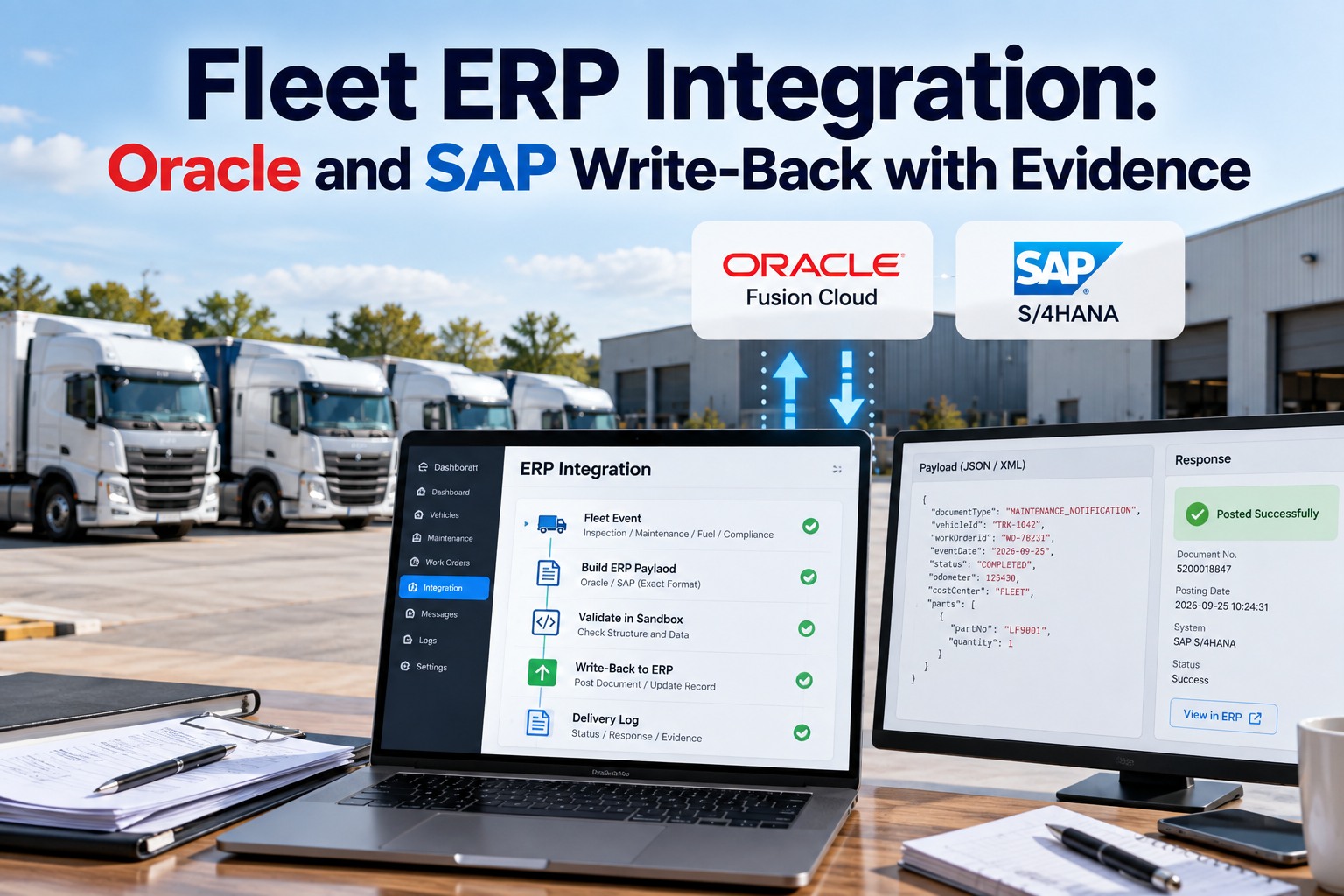
"It was sent" is not a fact. The reply is the fact. Oracle's own receiving API makes the point better than any vendor could: post a receipt and it returns SUCCESS or ERROR if it processed synchronously, but SUBMITTED or QUEUED if it did not — and records sitting at PENDING have not been picked up at all. An integration that logs a 200 and discards the body genuinely cannot tell you whether the receipt exists. That is the whole argument for treating write-back as evidence rather than plumbing: keep the exact message, keep the exact reply, and be able to replay both. See the payload before it sends and the difference between an integration you can audit and one you can only restart becomes concrete.
Your ERP Owns the Plan and the Money. What It Cannot Know Is What Actually Happened.
For integration leads, IT and finance: how an observed fact gets filed as the document type it actually is, why a sandbox that only mocks the call is worth nothing, and what a delivery log has to contain before anybody should trust the word "delivered".
No credit card required. Write-back off by default, on when you decide.
Four States, and Three of Them Are Visible
The failure mode that costs most is none of these. It is the fact that was quietly dropped because it had nowhere to go, and nobody found out for a quarter.
The distinction that matters is between Failed and Blocked. Failed means the ERP was unreachable or refused the message, and retrying is the right answer. Blocked means the message is perfectly good but there is no document to attach it to yet — retrying that forever achieves nothing, because what it needs is a reference number. Systems that collapse both into "error" bury a five-second fix inside a retry queue. Held is different again: the observation itself was uncertain, and sending an uncertain reading into a system of record is worse than leaving a gap, because a gap gets investigated and a plausible number does not.
Filing a Fact as the Document It Actually Is
This is where most integrations go wrong, and it is not a technical failure. It is a modelling one: a depot produces several kinds of fact, and they do not all belong on a transport record. Map your own event types in a test connection. Swipe the table on mobile.
| What was observed | Where it belongs | Why |
|---|---|---|
| A gate arrival, a departure, dwell or detention | The transport document | Because it is an event on a movement, and that is where freight and billing already look |
| A defect or damage found on a vehicle | A maintenance notification | Because it is the start of a repair, not an event on today's delivery — filing it against the trip loses it the moment the trip closes |
| An odometer reading or a tread depth | A measurement against the asset | Because it is a value on a thing that persists, not a transaction |
| A put-away, a return or a transfer | A stock movement | Because inventory changed location or state, and the balance has to follow |
| Proof of delivery and any shortage | The delivery document | Because billing and claims already look there, and a claim has a clock on it |
A defect is a maintenance notification, not a line on today's delivery
When a driver reports damage at a stop, the instinct is to attach it to the delivery, because that is where it was found. But a defect is the beginning of a repair with its own lifecycle, and the delivery closes in hours. File it against the trip and it disappears with the trip; file it as a maintenance notification and it survives long enough to become a job. The same logic governs an odometer or tread reading — that is a measurement against an asset that persists, not a transaction that settles.
What the ERP's Own API Tells You About Trusting "Sent"
receivingReceiptRequestsThe endpoint that creates receipts — standard, ASN, RMA, in-transit shipment and transfer order receipts — is /fscmRestApi/resources/11.13.18.05/receivingReceiptRequests, posted to. What it does next depends on flags you set on the request itself.
Processes the posted interface data immediately and returns. Set it false and the records land in interface tables, to be processed later by the Manage Receiving Transactions scheduled process.
SUCCESS or ERROR when processing is synchronous. SUBMITTED or QUEUED when it is not — which is not the same as done.
Only records at PENDING get picked up for processing. Errors move to ERROR, completions to SUCCESS. A row can sit at PENDING indefinitely and nothing about the original call will tell you.
So "the API returned 200" and "the receipt exists" are two different statements, and only one of them is checkable. An integration that keeps the reply can tell you which one you have. One that does not is asking you to take its word.
Resource path, flags, status fields and their default values are per Oracle's REST API documentation for Fusion Cloud SCM receiving receipt requests. Versions move, so confirm the path and field behaviour against the release you are actually integrating with. SAP models the same facts differently again — a defect belongs to plant maintenance rather than to a delivery — and the mapping principle holds even though the object names do not.
Can You Show an Auditor the Exact Message You Sent in March?
If the answer is a log line saying success, that is not evidence, it is a claim. In thirty minutes we will connect a sandbox, build the real message for one of your own event types, and show you the inspector, the ledger and the delivery log with nothing switched on and nothing leaving your network.
How FleetRabbit Handles This
Integrations, then ERP Hub, then Connections. Enter the SAP or Oracle endpoint and credentials, and choose sandbox or production.
The platform proves it can reach them and that the credentials are accepted, before anything at all is switched on.
Off is the default. Until this is on, facts are recorded here and sent nowhere.
The inspector shows the exact message that will be sent for any event type, before a single one goes out.
A gate arrival, a tread reading, a short delivery.
The freight order, shipment, transfer order or asset it belongs to.
Transport document, maintenance notification, measurement or stock movement — with the evidence link alongside.
The exact message sent and the exact reply received are both kept, and can be replayed.
The Four Screens Worth Having
An integration lead asks three questions in this order: show me the payload, show me what you sent, show me what happens when it fails. Swipe the table on mobile.
| Screen | What it answers | Why it earns its place |
|---|---|---|
| Ledger | Every fact observed today, what it was matched to, and whether it reached the ERP | The one screen that answers ‘did it land’ without anyone opening a log file |
| Delivery log | Per attempt: the message body, the response, the status code, how many tries | This is what makes a dispute with an ERP team a five-minute conversation |
| Payload inspector | Pick any event type and see the message side by side, before sending anything | So the integration lead signs off the shape before a firewall rule exists |
| Connections | Endpoints, environment, write-back on or off, last test result | Because ‘which environment is this pointing at’ should never be a guess |
Keep the write-back log on the same unit record as the inspection report and the preventive maintenance schedule, so a maintenance notification that never reached the ERP is visible next to the defect that raised it rather than in a separate integration console nobody opens.
ERP Integration Questions IT Teams Ask
What does ERP write-back actually mean?
Taking facts observed in the physical world — arrivals, readings, defects, receipts — and posting them into the system of record as the document type they belong to, automatically, with the evidence attached. It is the opposite direction from a telematics integration, which pulls data in. See it running against a sandbox.
Does this change anything inside our ERP?
It should not. Your ERP keeps owning the plan, the money and the master data. Write-back adds observations against documents that already exist there. Creating the underlying orders from outside is a different and much larger problem, and a capture layer that claims to solve it is overreaching. Start with one event type.
What happens when the ERP is down?
Nothing is lost, because the fact is recorded first and delivered afterwards. Failed deliveries retry on a widening schedule without anyone watching. The state that needs a human is Blocked — a good message with no document to attach to — and that waits visibly with the reason shown rather than being dropped or attached to the wrong record. See the failure states.
Why is a sandbox that mocks the call not good enough?
Because a mock proves your code runs, not that your message is right. A sandbox worth the name builds the identical payload from real data and stops immediately before the network, so the integration lead reviews actual bytes. Mocks tend to be discovered as inadequate at the exact moment production goes live. Try the real dry run.
Should a vehicle defect be posted against the delivery?
No. A defect starts a repair and needs to outlive the trip it was found on. Filed against today's delivery it closes with the delivery; filed as a maintenance notification it survives to become a job. This single mapping decision causes more lost work than any technical failure in the pipeline. Review your mapping with us.
How do we prove to an auditor that a fact reached the ERP?
By keeping the exact message and the exact reply, per attempt, with the status code and the retry count, and being able to replay them. A log line that says "success" is a claim about the past with nothing behind it. This matters more than it sounds once an ERP processes asynchronously and a queued message is not a completed one. Keep replayable evidence free.
Can we turn write-back on gradually?
You should. Off is the sensible default, and the right sequence is connect, test the credentials, review the payload for one event type, enable that one, watch it, then widen. Switching everything on at once means your first production issue arrives across five document types simultaneously. Plan the sequence with our team.
Keep the Message, Keep the Reply, Keep the Right to Replay Both
FleetRabbit records every observed fact first and delivers it afterwards, files it as the document type it actually is, holds anything uncertain rather than guessing, and keeps the exact payload and response for every attempt — beside the same unit's open work orders and inspection history.
No credit card required. Sandbox first, nothing leaves your network.