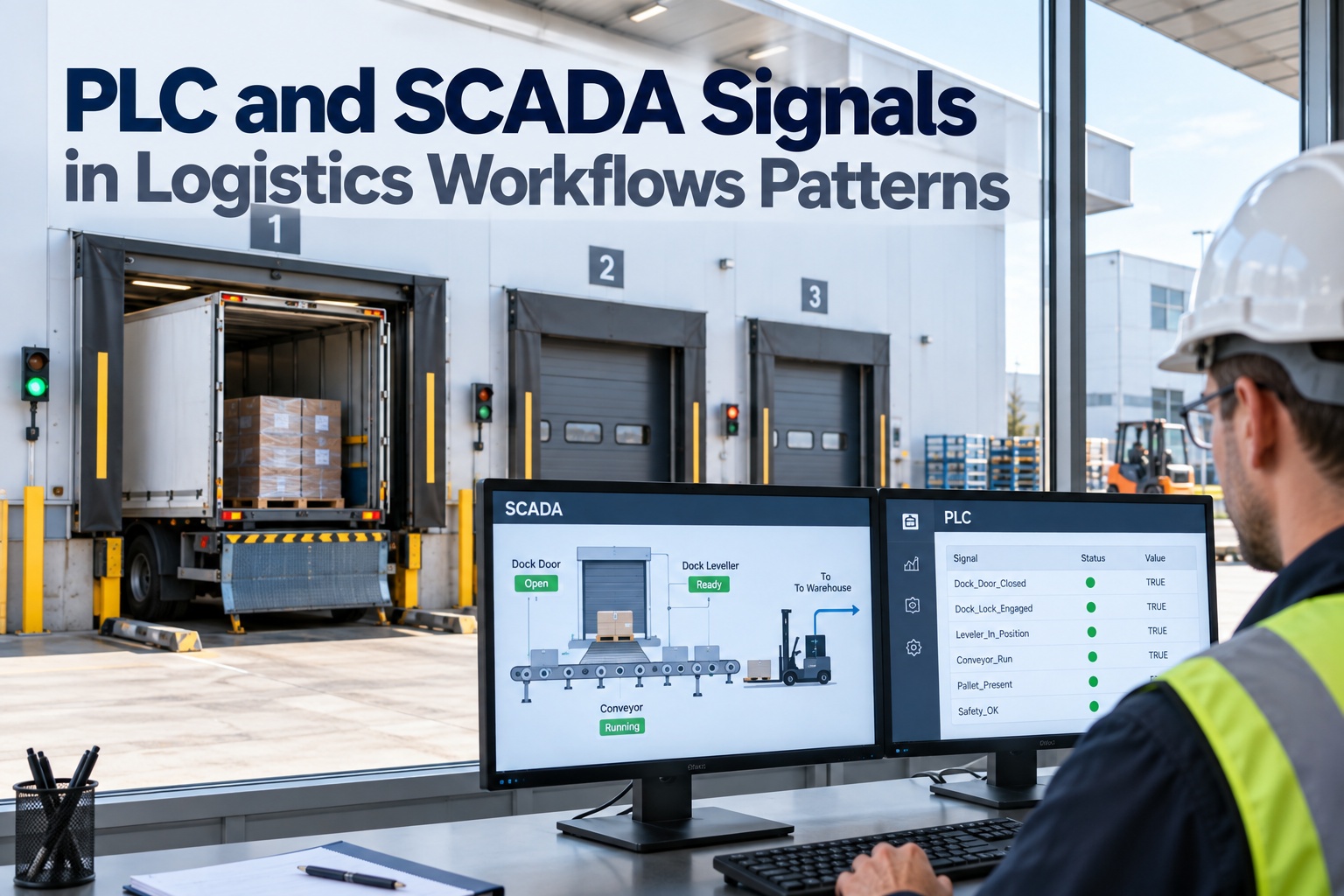
A dock leveller does not care about your warehouse management system, and your ERP does not understand a rising edge on a proximity sensor. Everything useful in plant logistics happens in the translation between them — and that translation is where most IT/OT integration projects quietly go wrong. The failure is rarely the protocol. It is that a handshake had no timeout, an interlock was implemented in SCADA instead of the safety PLC, or a business transaction fired twice because nobody defined which side owns the acknowledgement. This guide covers the patterns that hold up in production: dock leveller and door interlock sequences, conveyor handshake design, where the safety boundary must sit, how PLC and SCADA logistics signals map to ERP transactions, and the change control that keeps all of it stable after go-live. Request an enterprise demo to walk your own signal map, or start a free trial to see equipment events land as maintenance actions.
IT/OT INTEGRATION PATTERNS · PLANT LOGISTICS
PLC and SCADA Signals in Logistics Workflows
Interlocks, handshakes, safety boundaries and change control — the four things that decide whether plant floor signals become reliable business events or a permanent source of 3am phone calls.
Interlocks Permissive logic, not suggestions
Handshakes Four states, always timed
Safety Never crosses into IT
Change Control Or it drifts in weeks
The Three Layers, and the One That Must Never Move
Before any pattern makes sense, be explicit about which layer owns which decision. The single most expensive mistake in plant IT OT integration is letting a layer take responsibility it cannot guarantee — usually SCADA or an edge gateway making a decision that belongs to a safety-rated controller.
Safety LayerHARD BOUNDARY
Safety PLC, safety relays, light curtains, e-stops, restraint interlocks. Rated to ISO 13849 PL / IEC 62061 SIL. Deterministic, self-monitoring, independently validated.
Owns: anything that prevents injury. Never depends on network, SCADA or IT availability.
Control LayerREAL TIME
Standard PLCs, drives, sequence logic, conveyor zone handshakes, dock equipment sequencing, local HMI. Millisecond scan cycles, deterministic behaviour.
Owns: sequencing and equipment state. Reports outcomes upward; never waits on IT to move a pallet.
Information LayerEVENTUAL
SCADA, historian, OPC UA clients, middleware, WMS and ERP. Best-effort timing, retry-tolerant, business context and audit trail.
Owns: what the event means commercially. Tolerates latency; must never be a precondition for physical motion.
Test for a bad design: if the ERP goes down for two hours, does the dock stop working? If yes, a business decision has been placed inside a physical process.
Dock Leveller and Door Interlock Sequences
A loading bay is a small state machine with real consequences. The classic incident — a trailer pulling away mid-load — is prevented by permissive logic, not by procedure. Each step below must be a hard precondition in the controller, with the status made visible to the information layer as read-only telemetry.
1Trailer arrives, outside light red
Driver is signalled to hold. No permissive granted yet. Arrival timestamped for turnaround measurement.
2Vehicle restraint engages
Restraint or wheel chock confirms engagement via its own sensor. This feedback — not the command — is the permissive.
3Dock door release permitted
Door open is only enabled with restraint confirmed. Door position feedback is a separate input from the open command.
4Leveller deploys, lip seated
Leveller requires door-open confirmed. Lip-seated sensor gates the next step; a timeout here raises a fault, not a retry loop.
5Inside light green, loading live
Only now does the bay report "ready to load" upward. WMS sees a state it can trust because the equipment already proved it.
6Reverse sequence to release
Lip stowed, door closed, restraint released, outside light green — strictly in order. Release cannot be commanded from IT.
DESIGN RULES
Feedback, not commands. Every permissive reads a sensor confirming the physical state, never the output bit that requested it.
One direction only. The information layer subscribes to bay state. It may request, but it may never force a step.
Timeouts on every transition. A step that stalls must raise a named fault with the step ID, so diagnostics are instant.
Manual override is logged. Bypass exists in every real plant. Make it an auditable event with operator identity, not a hidden key switch.
Expose durations. Time in each state is your turnaround data. Capture it at the controller, not by inference from WMS.
Dock equipment is also maintainable equipment. Cycle counts, restraint faults and leveller run hours are condition-based maintenance inputs — the same telemetry described in our OPC UA plant data integration guide can drive
automated work orders.
Request Enterprise Demo
Conveyor Handshakes: Four States, Never Three
A conveyor transfer between zones, or between a conveyor and an AS/RS or sorter, is a contract. Truncated handshakes — request and go, with no completion confirmation — are the reason loads get double-counted or lost between systems. The full exchange has four states plus an explicit fault path.
UPSTREAM ZONEDOWNSTREAM ZONE
LoadPresent + TransferRequestLoad detected at discharge, upstream asserts request and holds it
TransferPermitDownstream confirms zone empty, drive healthy, no fault. Permit is level, not pulse
TransferInProgressMotion starts. Both sides now own a timeout on this state
TransferCompleteDownstream photo-eye confirms arrival. Only this clears the upstream request
TransferFault (either side, any time)Jam, timeout expiry, or drive fault. Handshake resets to a known state — never to an assumed one
The load only exists in one place at a time. Inventory increments downstream on TransferComplete, never on TransferRequest — that single rule eliminates the most common phantom-stock defect in conveyor-fed operations.
The Signal Contract
Every signal crossing a boundary needs a defined contract before anyone writes integration code. Vague signals produce integrations that work in commissioning and fail in peak season. These are the attributes to specify for each PLC SCADA logistics signals tag.
AttributeWhy it mattersExample
Signal typeEdge-triggered events and level-held states behave differently on reconnectLevel
OwnerExactly one system writes it; everyone else reads. Prevents write racesPLC only
TimeoutUndefined timeouts become infinite waits during a fault5000 ms
Reset conditionStates that only a power cycle clears will be cleared by a power cycle, at the worst timeOn Complete
Quality handlingStale or bad-quality reads must not be treated as valid zerosReject non-Good
Idempotency keyLets the business layer safely retry without duplicating a transactionHU + timestamp
HeartbeatDistinguishes "nothing happened" from "the link died quietly"1 Hz counter
Safety Boundaries: What Must Never Cross
Safety functions are validated as a whole system. Routing any part of one through SCADA, a gateway, a broker or a cloud service invalidates that validation — regardless of how reliable the network appears. The information layer observes safety state; it never participates in it.
✕ Never crosses the boundary
E-stop logic or reset authority
Light curtain and muting decisions
Vehicle restraint release permissives
Guard door locking logic
Safe torque off / safe speed commands
Any function with a PL or SIL rating
SAFETY BOUNDARY
✓ Safe to publish upward
Safety state as read-only status
E-stop activated, with location and time
Fault codes and diagnostic text
Downtime duration and reason codes
Reset-performed audit events
Cycle counts and equipment run hours
Integration Patterns Compared
How signals reach business systems is a separate decision from how they are generated. Each industrial data integration pattern trades latency against coupling and operational blast radius.
Keep a manual fallback for every automated confirmation path. The plants that survive an integration outage are the ones where an operator can still scan a handling unit and keep trucks moving.
Mapping Signals to Business Transactions
This is where the integration earns its money: a physical event becomes an accounting event. Each row below is a boundary that needs an owner, a timeout and an idempotency rule — particularly in SAP integration automotive and high-volume logistics environments where duplicate postings are costly to unwind.
Plant SignalBusiness TransactionFailure Rule
Dock bay state → Ready to loadShipment execution startRetry safe — state is level-held
Scanner read at inbound doorGoods receipt / ASN matchDedupe on barcode + 30s window
Weighbridge stable readingWeight confirmation on documentOnly post on stable flag, never live value
Conveyor TransferCompleteHandling unit movement postingIdempotency key = HU + destination
Sorter divert confirmedBin assignment updateReconcile against divert counter hourly
Equipment fault + downtimeMaintenance notification / work orderDebounce; suppress duplicates in window
Leveller / door cycle countUsage-based PM triggerMonotonic counter, tolerate gaps
Map your signals before you write the integration
An enterprise session walks your dock, conveyor and equipment signals end to end — owners, timeouts, idempotency rules and which events should be creating maintenance work instead of sitting in a historian.
Signal ownership mapInterlock reviewHandshake auditMaintenance trigger design
Change Control on the OT Side
Integrations do not decay because the code was wrong. They decay because someone downloaded a modified PLC program at 22:00 on a Friday and the tag they renamed was feeding a business transaction. OT change control is the least glamorous and highest-return part of the whole programme.
01
Version control the PLC program
Source in a repository with diffs, not a ZIP on an engineer's laptop named final_v3_REAL. You cannot review what you cannot compare.
02
Treat tag names as a public API
Any tag consumed by SCADA, middleware or ERP is a contract. Renaming requires the same review as changing a database schema in production.
03
Defined download windows
Scheduled, announced, with a named approver and a rollback plan. Emergency changes get a retrospective review, not an exemption.
04
Verified backup before every change
Restore-tested, not just taken. An untested backup is a hope, and hope has a long mean time to repair.
05
Safety changes revalidated separately
Any modification touching a safety function goes through the safety validation process. It is never bundled into a routine logic release.
06
Integration regression checklist
A short, real test set run after every download: handshake completes, heartbeat alive, one transaction posts end to end, fault path raises correctly.
Anti-Patterns to Refuse
Each of these appears reasonable in a design meeting and creates a recurring incident within months.
✕
Business logic in ladder
Customer-specific rules embedded in PLC code. Every commercial change becomes a controls project with a download window.
✕
ERP in the motion path
Equipment waiting synchronously on a business system response. Latency becomes downtime and outages become stoppages.
✕
Shared read-write tags
Two systems writing the same tag. The winner changes with load, which is the hardest class of defect to reproduce.
✕
Pulse signals across the boundary
A 200 ms pulse read by a 1-second poll is a coin flip. Cross-boundary signals are level-held with explicit acknowledgement.
✕
Silence treated as health
No heartbeat means a dead link looks identical to an idle line. Absence of data must be an alarm, not a default.
✕
Safety observed through SCADA only
Using SCADA status as proof a safety function worked. SCADA reports what it was told; validation requires the safety system itself.
Frequently Asked Questions
Should SCADA or middleware be the integration layer?
SCADA is the pragmatic choice in brownfield sites where it already holds a complete, well-maintained tag set. Dedicated middleware or an OPC UA client wins when multiple consumers need the same data, because it decouples business system release cycles from the controls network. What you should not do is both, with no defined owner per signal.
Is there a PLC SCADA logistics signals API we can call?
Not directly, and that is intentional. Applications should consume an interface presented by the integration layer — OPC UA services, a REST endpoint or a message stream — while that layer owns the controller connection. Exposing controllers to application traffic couples your release cadence to your production line.
How do we handle ERP downtime without stopping the dock?
Buffer at the edge with store-and-forward, keep every posting idempotent so replay is safe, and maintain a manual confirmation fallback. The physical process continues; the business transactions catch up. This requires deciding in advance which confirmations can be deferred and which genuinely gate a movement.
Can safety signals be sent to the cloud?
Safety status can be published for visibility, alarming and analytics. Safety functions cannot be implemented across that path under any circumstances. The distinction is whether the remote system is observing an outcome or participating in the decision — observation is fine, participation invalidates the safety validation.
What does SAP integration look like in practice?
Three common routes: direct telegram exchange between PLCs and SAP EWM material flow control for tightly coupled automation; a plant connectivity layer that speaks OPC UA and presents events to SAP; or a message stream that SAP consumes asynchronously. Coupling tightness, not vendor preference, should drive the choice.
How do these signals feed maintenance?
Cycle counts, fault codes, downtime duration and run hours are already present in the control layer. Published upward, they convert time-based PM into usage-based and condition-based maintenance — the approach covered in our
preventive maintenance guide and
predictive maintenance guide.
Make Plant Signals Do Real Work
Dock faults, conveyor jams, cycle counts and run hours are already being generated. FleetRabbit turns them into automated work orders, usage-based PM schedules and a complete asset history — across dock equipment, handling fleets and plant vehicles.